Friday, May 22, 2015

Digit Transforms with Genesys SIP Server

Summary

In this article I'll demonstrate a simple digit translation using the dial plan feature in Genesys SIP Server (SIPS)

Implementation

For this scenario, I have a Sonus Session Border Controller (SBC) in front of Genesys SIPS.  The Sonus SBC by default prepends a '+1'  (e.164 format) on all calls going in/out of its trunk groups.  In this example, I'm going to use the SIPS dial plan feature to remove those two characters from the dialed number.

In Figure 1 below I've created a DN of type Voice over IP Service under the SIPS switch object.

Figure 1
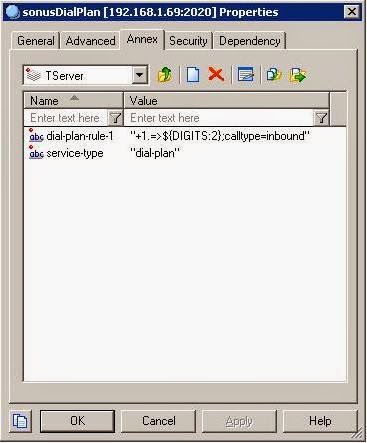
In Figure 2, I created a TServer Section for this object and then added two options to that section:  dial-plan-rule-1 and service-type.

Figure 2
The dial-plan-rule-<n> option establishes a digit manipulation rule.  The service-type option signifies this is a dial-plan configuration (vs a Class of Service configuration).

SIPS translation rules roughly follow the Asterisk standard:

+1.=>${DIGITS:2}
  • On the left-hand side of the =>, I state our matching criteria.  In this case, a '+1' and then one or more following character will yield a match.
  • On the right side, I state our translation.  In this case, retain all the digits from position 2 in the string - dropping the first two characters.  Similar to C arrays, position numbering starts from 0.
After creating the dial-plan object, it needs to be assigned to an Agent Login, DN, or App level.  Figure 3 depicts the trunk object for the Sonus SBC.

Figure 3
Figure 4 shows the TServer section I created in the Annex for this trunk object.  I have the IP address of the SBC's media interface and an option specifying the dial-plan (sonusDialPlan) created back in Figure 2.

Figure 4

Below are some snippets of the Genesys SIPS log to see this dial-plan feature in action.  The SIPS extension/called party is 999-123-4567.  The caller is 5555.

Incoming Invite from the Sonus SBC:

11:02:35.281: SIPTR: Received [0,UDP] 1003 bytes from 192.168.1.21:5060
INVITE sip:+19991234567@192.168.1.69:5060;user=phone SIP/2.0
Via: SIP/2.0/UDP 192.168.1.21:5060;branch=z9hG4bK00B00006d2998922276
From: <sip:+15555@192.168.1.21;user=phone>;tag=gK00000184
To: <sip:+19991234567@192.168.1.69;user=phone>
Call-ID: 1_41283677@192.168.1.21
CSeq: 55481280 INVITE
Max-Forwards: 70
Allow: INVITE,ACK,CANCEL,BYE,REGISTER,REFER,INFO,SUBSCRIBE,NOTIFY,PRACK,UPDATE,OPTIONS,MESSAGE,PUBLISH
Accept: application/sdp, application/isup, application/dtmf, application/dtmf-relay,  multipart/mixed
Contact: <sip:+15555@192.168.1.21:5060>
P-Preferred-Identity: <sip:+15555@192.168.1.21:5060;user=phone>
Supported: timer,100rel,precondition,replaces
Session-Expires: 1800
Min-SE: 90
Content-Length:   189
Content-Disposition: session; handling=required
Content-Type: application/sdp

v=0
o=Sonus_UAC 1794294632 2031408208 IN IP4 192.168.1.21
s=SIP Media Capabilities
c=IN IP4 192.168.1.21
t=0 0
m=audio 1026 RTP/AVP 0
a=rtpmap:0 PCMU/8000
a=sendrecv
a=maxptime:10


Dial-plan executing:

11:02:35.284: SIPTR(432): Step 0 - SipTransactionCreateCall(433) complete
11:02:35.284: SIPTR(432): Begin step 1 - SipTransactionResolveCallInfoByDialPlan(434)
11:02:35.284: DialPlan:executing for dest +19991234567 - dial-plan-rule-1: +1.=>${DIGITS:2};calltype=inbound
11:02:35.285: DialPlan:Sending to target '9991234567' - type=1
11:02:35.285: DialPlan: clear flag DIAL_PLAN_PROCESSING
11:02:35.286: ProcessDialPlanResult: Connecting to device 9991234567.
11:02:35.286: SIPTS: New call: CallType overridden with 2 by context


Resulting SIP Invite that is ultimately sent to the SIPS registered end-point:

11:02:35.289: Sending  [0,UDP] 1094 bytes to 192.168.1.71:26144 >>>>>
INVITE sip:9991234567@192.168.1.71:26144;rinstance=0aa264f9d95b3d6a SIP/2.0
From: sip:+15555@192.168.1.21;user=phone;tag=008A0624-66D4-155B-B7A7-0100007FAA77-144
To: sip:9991234567@9991234567
Call-ID: 008A05C0-66D4-155B-B7A7-0100007FAA77-91@192.168.1.69
CSeq: 1 INVITE
Content-Length: 180
Content-Type: application/sdp
Via: SIP/2.0/UDP 192.168.1.69:5060;branch=z9hG4bK008A0660-66D4-155B-B7A7-0100007FAA77-136
Contact: <sip:+15555@192.168.1.69:5060>
Allow: ACK, BYE, CANCEL, INFO, INVITE, MESSAGE, NOTIFY, OPTIONS, PRACK, REFER, UPDATE
Accept: application/sdp, application/isup, application/dtmf, application/dtmf-relay,  multipart/mixed
P-Preferred-Identity: <sip:+15555@192.168.1.21:5060;user=phone>
Content-Disposition: session; handling=required
Max-Forwards: 69
X-Genesys-CallUUID: 028BE9J6QGALNDT704000VTAES00001A
Session-Expires: 1800;refresher=uac
Min-SE: 90
Supported: uui,100rel,timer

v=0
o=Sonus_UAC 1432141492 1 IN IP4 192.168.1.21
s=SIP Media Capabilities
c=IN IP4 192.168.1.21
t=0 0
m=audio 1026 RTP/AVP 0
a=sendrecv
a=maxptime:10
a=rtpmap:0 PCMU/8000

Copyright ©1993-2024 Joey E Whelan, All rights reserved.

Saturday, April 18, 2015

Taming YouTube


Summary

It's pretty easy to completely blow out a monthly bandwidth cap with streaming video traffic.  This article going to discuss the options for throttling this traffic before you get in trouble with your ISP (or wallet) due to data overages.

Identifying the Problem

A nifty 3rd Party tool for monitoring router traffic is MRTG.  It's a Perl-based web app that provides nice graphical displays of router statistics.  MRTG pulls its stats off the router via SNMP, so you'll need to configure that on your router.  You'll also need to set up a web server for it (Apache works just fine).  Figure 1 below depicts a MRTG-generated table of a hypothetical "problem" (note the Ingress number of 1.41 TB).

Figure 1
Now, if you want to do some real-time analysis, there's a tool right there on the router: Cisco IOS Netflow.  There are a lot of capabilities included in Netflow, but I'm only going to touch on one - Top Talkers.

Top Talkers is just what it sounds like - a real-time depiction of the flows that are generating the most traffic.  Setting it up is easy.

The first step is to activate Netflow on the interface you want to monitor.  That can be in the ingress, egress, or both directions.
router(config)#int gi1/0
router(config-if)#ip flow ingress
router(config-if)#ip flow egress
The next and final step is to activate and configure the Top Talkers feature.
router(config)#ip flow-top-talkers
router(config-flow-top-talkers)#sort-by bytes
router(config-flow-top-talkers)#top 3
In this case, the commands above configure a display of the top three talkers, sorted by byte count.

Now to see some real-time stats:
router#show ip flow top-talkers
SrcIf         SrcIPaddress    DstIf         DstIPaddress    Pr SrcP DstP Bytes
Di1           173.194.141.140 Gi1/0*        192.168.1.85    06 01BB B49D    35M
Gi1/0         192.168.1.85    Di1           173.194.141.140 06 B49D 01BB   774K
Di1           173.194.141.140 Gi1/0*        192.168.1.85    06 01BB B4A0   334K
Clearly, there's some fairly heavy ingress traffic (35M thus far) going on between a 173.194.141.140 address and a local/private 192 address.  A quick whois on that 173 address reveals it's in Google's IP range.  More specifically, this is YouTube video traffic.

As far as inspecting real-time traffic - the tool of choice is Wireshark.  There are some network monitoring capabilities built into Chrome and Firefox as well, but they're primarily focused on the HTTP layer.

Solving the Problem

There are various factors that influence streaming bit-rates, but Netflix gives some general guidance of 3 Mbps for SD video and 5 Mbps for HD.  Some more detailed info from Google regarding YouTube here.

A rough calculation (using Netflix's guidelines) of the amount of bandwidth burned streaming 1 hour of HD video is:

60 min/hr * 60 sec/min * 5 Mb/sec = 18,000 Mb/hr = 2,250 MB/hr = 2.25 GB/hr 

As expected, the meter runs pretty fast with streaming video traffic - particularly HD.

Site Settings

There are some easy measures you can take to limit bandwidth on the streaming sites themselves.  You can simply turn down the bandwidth usage for the particular site in the end-user's account settings.  Unfortunately, depending on users to voluntarily degrade their video quality probably isn't realistic.  The rest of this article will mostly focus on the options for imposing limits on the network itself.

Traffic Policing & Shaping

Cisco has a wealth of info published on the policing/shaping topic so I'm not going to spend too much time on the details.  Grossly simplifying the process: "policing" traffic results in dropping it when a defined bandwidth limit is reached.  "Shaping" traffic uses router resources (memory) to queue traffic to avoid dropping it.  However, shaping will degenerate into dropping packets if the traffic reaches a level beyond the limits of the queuing resources.

Figure 2 below is a simple diagram depicting on where to implement policing and shaping.  The main concept of note: traffic policing should happen on the inbound interface; shaping has to happen on the outbound interface.

Figure 2

IOS Commands for Configuring Policing and Shaping

Implementation of shaping and policing follow the same basic steps:
  1. Define 'class'es of traffic that you want to manage.
  2. Create a policy that allocates bandwidth and/or makes modifications to the classes.
  3. Apply the policy to an interface.
Below is a first attempt at defining a traffic class for streaming video:
class-map match-any http-video-class
 match protocol video-over-http
Line 1 defines the class and matching criteria.
Line 2 invokes Cisco's NBAR feature to utilize a pre-built signature for matching HTTP-based video.

Below is a sample policing policy:
policy-map http-video-police
 class http-video-class
  police 1000000 187500 conform-action transmit exceed-action drop
Line 1 names the policy.
Line 2 invokes the video class we defined above.
Line 3 applies a police policy to that video class.  The class is given bandwidth of 1 Mbps with a possible burst of 187.5 Kbps.  Traffic that conforms to that bandwidth limitation is transmitted; otherwise, the traffic is dropped.

Similarly, below is a sample shaping policy:
policy-map http-video-shape
 class http-video-class
  shape average 2000000
  queue-limit 128 packets
Line 3 applies a shaping policy to the video class. Max bandwidth is 2 Mbps.
Line 4 allocates a queue size of 128. The default is 64.

The last step is to apply the policy to an interface.
interface GigabitEthernet1/0
 ip address 10.20.30.1 255.255.255.0
 service-policy output http-video-shape
Line 4 applies the shaping policy to this interface. As discussed previously, shaping/queuing happens in outbound the direction.

The command below will allow you to view real-time statistics on the policy in action:
router#show policy-map int "yourInt"

Video Classification Case Studies

In the example above, I gave the impression that the pre-defined 'video-over-http' NBAR signature was sufficient to classify all of the streaming video out there.  Unfortunately, that's not the case, at all.  Different video providers are implementing streaming differently.  Part of that is due to the fact we're in a technology transition period - HTML5 is replacing Flash as the streaming video standard.  However, there are other factors at work - in particular with YouTube - that make this classification task (and thereby the whole concept of rate limiting video) non-trivial.  Below are a few video providers that I took the time to analyze and document their streaming behavior:  Amazon Prime, Netflix, and YouTube.

Of note, I had to load the latest NBAR2 Protocol Pack (ver 13) to get the correct NBAR signatures for identifying Netflix and YouTube traffic.  That also required an IOS upgrade to the latest version which has a bug of some sorts in its PPP implementation.  Nothing can ever be easy.

Amazon Prime

Amazon currently uses Microsoft Silverlight by default but will fall back to Flash with the Hardware Abstraction Layer (HAL) module if Silverlight isn't available.  Both options were evidently motivated by the need to be in DRM compliance.

For folks that use Linux and want to watch Prime on their browser, you're kind of in a bind given how Amazon has implemented streaming.  Obviously, Silverlight won't work out of box for you (but a substitute plugin has been written - Pipelight).  And, on the Flash front - Flash/HAL flat out won't work in Chrome and requires a hack to even work in Firefox.  Instructions here on that hack.

Assuming a Flash implementation against Amazon Prime - classifying Prime traffic is simple.  Flash is using RTMP as the underlying streaming protocol.  Prime is using RTMPE, the encrypted version of RTMP.  So, a NBAR rule for RTMPE will catch Prime streaming traffic.  Incidentally, the built-in NBAR signature for Prime (amazon-instant-video) doesn't identify this Flash traffic.

Our http-video-class looks like this for classifying Amazon Prime traffic (Flash-based).
class-map match-any http-video-class
 match protocol rtmpe

Below is a real-time snapshot of the shaping policy at work on Amazon traffic:
router#show policy-map int gi1/0
 GigabitEthernet1/0 

  Service-policy output: http-video-shape

    Class-map: http-video-class (match-any)  
      9626 packets, 14460061 bytes
      5 minute offered rate 323000 bps, drop rate 0000 bps
      Match: protocol rtmpe
        9626 packets, 14460061 bytes
        5 minute rate 323000 bps
      Queueing
      queue limit 128 packets
      (queue depth/total drops/no-buffer drops) 41/0/0
      (pkts output/bytes output) 9626/14460061
      shape (average) cir 2000000, bc 8000, be 8000
      target shape rate 2000000
      

    Class-map: class-default (match-any)  
      18205 packets, 24550571 bytes
      5 minute offered rate 474000 bps, drop rate 0000 bps
      Match: any 
      
      queue limit 64 packets
      (queue depth/total drops/no-buffer drops) 0/0/0
      (pkts output/bytes output) 18204/24550505

As an aside - the Amazon Flash traffic has a source port of 1935 (TCP).  So, if you don't have a router that supports signatures - it's still easy to classify Amazon's traffic with a simple ACL such as this:
access-list 111 permit tcp any eq 1935 any

Netflix

Netflix just recently started showing some love to those of us in the Linux community.  They were a 100% MS Silverlight shop last year.  Today, they've adopted HTML5 video as well.  HTML5 video tag snippet below from a Netflix page:

<video src="blob:http%3A//www.netflix.com/bc9c980c-5bf9-47f0-b1b4-423de9ee289a" style="position: absolute; width: 100%; height: 100%;"></video>

The current releases of Chrome on Linux will work with the Netflix player (Firefox is not supported, so the inverse of Amazon Prime).

The traffic profile for Netflix is fairly straight-forward.  Netflix streaming traffic is TCP packets sourced from port 80.  The current NBAR Protocol Pack (ver 13) correctly classifies Netflix traffic.  So, adding a match for Netflix to our existing class-map yields this:
class-map match-any http-video-class
 match protocol rtmpe
 match protocol netflix

Traffic statistics output below with the Netflix class match added:
router#show policy-map int gi1/0
 GigabitEthernet1/0 

  Service-policy output: http-video-shape

    Class-map: http-video-class (match-any)  
      19090 packets, 28450585 bytes
      5 minute offered rate 222000 bps, drop rate 0000 bps
      Match: protocol rtmpe
        12390 packets, 18618543 bytes
        5 minute rate 0 bps
      Match: protocol netflix
        6700 packets, 9832042 bytes
        5 minute rate 222000 bps
      Queueing
      queue limit 128 packets
      (queue depth/total drops/no-buffer drops) 56/25/0
      (pkts output/bytes output) 19057/28401286
      shape (average) cir 2000000, bc 8000, be 8000
      target shape rate 2000000
      

    Class-map: class-default (match-any)  
      99486 packets, 108676494 bytes
      5 minute offered rate 143000 bps, drop rate 0000 bps
      Match: any 
      
      queue limit 64 packets
      (queue depth/total drops/no-buffer drops) 0/0/0
      (pkts output/bytes output) 99307/108536983

YouTube

Similar to Amazon, YouTube also used Flash previously but they have since moved on to HTML5 video.  Code snippet below from a YouTube page:

<video class="video-stream html5-main-video" style="width: 640px; height: 360px; left: 0px; top: 0px; transform: none;" src="blob:https%3A//www.youtube.com/57c207a1-5fb8-4383-94ec-4fd298f0944e"></video>

Similar to Netflix, they're using a File API blob for the video source (in memory) with Media Source Extensions.  This allows them to do cool stuff like adaptive streaming, restrict downloads to relevant portions of the video, etc.

What makes YouTube more interesting though, from a traffic classification perspective, is they've moved to a 100% TLS access format.  That means YouTube traffic is encrypted/unreadable from Layer 3 (transport) up.  The following sorts of things just won't work for classifying YouTube traffic:

  • HTTP URL - You can't read any of the headers the HTTP segment (Layer 7, application).  It's encrypted.  There's no such thing as 'deep packet inspection' of this traffic.
  • HTTP Host - Same thing.
  • TCP Port - They're using TCP port 443, just like all the rest of the TLS traffic on your network.  You put limits on TCP 443, you limit all TLS traffic.
  • IP Address - Like many of the streaming providers, Google is using a content delivery network (CDN) for their video traffic.  It's common to see multiple different IP addresses delivering video in a single session.  It's all about finding the most efficient route for the content.  To boot, that CDN lives in Google's IP address range.  The Google IP range is >200K wide these days and growing, no doubt.  Neat discussion on how to count up Google's IP addresses yourself here.  Net, trying to maintain an IP address-based ACL for Google seems like an uphill battle.
So, TLS makes YouTube traffic a bit more challenging to manage.  I would wager Google knew this all along given today's semi-hostile environment between the content providers and the ISP's.  To that point - earlier this year, a Google engineer uncovered that Gogo, an inflight broadband provider, was using a less than wholesome method to manage YouTube traffic.  In a nutshell, Gogo was issuing fake TLS certs for YouTube.  As a Man-in-the-Middle, that would (did) enable Gogo to decrypt YouTube traffic.  Gogo evidently ceased this seedy practice shortly after it was uncovered.

In the Cisco world, the current NBAR Protocol Pack (version 13) does in fact have a working signature for identifying YouTube traffic.  So, throttling YouTube is a simple matter of adding it to the class-map:
class-map match-any http-video-class
 match protocol rtmpe
 match protocol netflix
 match protocol youtube

Results of that addition below:
router#show policy-map int gi1/0
 GigabitEthernet1/0 

  Service-policy output: http-video-shape

    Class-map: http-video-class (match-any)  
      54104 packets, 80313633 bytes
      5 minute offered rate 619000 bps, drop rate 7000 bps
      Match: protocol rtmpe
        12390 packets, 18618543 bytes
        5 minute rate 0 bps
      Match: protocol netflix
        18059 packets, 26614941 bytes
        5 minute rate 0 bps
      Match: protocol youtube
        23655 packets, 35080149 bytes
        5 minute rate 619000 bps
      Queueing
      queue limit 128 packets
      (queue depth/total drops/no-buffer drops) 0/511/0
      (pkts output/bytes output) 53575/79541510
      shape (average) cir 2000000, bc 8000, be 8000
      target shape rate 2000000
      

    Class-map: class-default (match-any)  
      172255 packets, 159978075 bytes
      5 minute offered rate 7000 bps, drop rate 0000 bps
      Match: any 
      
      queue limit 64 packets
      (queue depth/total drops/no-buffer drops) 0/0/0
      (pkts output/bytes output) 172197/159807489

Now the question is - How are they classifying this traffic?  I don't have access to the Cisco source code of their Protocol Pack, so I can only guess.  If someone out there does have a solid explanation of how Cisco or others have implemented this, I would appreciate you describing it in the comments section of this blog.

The options I can think of:
  1. IP address filter on the Google IP address range.  I discussed earlier how that maintenance task is probably unmanageable.  But, given Cisco issues regular updates on these Protocol Packs - maybe it's a workable model for them.
  2. Tracking flows based on an extension of the TLS spec known as Server Name Indication (SNI).  If you watch YouTube traffic in Wireshark, you will in fact see youtube.com and googlevideo.com in the SNI header. The SNI is unencrypted as it passed during the TLS handshake and prior to encryption.  A similar method can be implemented using the Common Name field in the X.509 certificate that is issued during the TLS handshake.  For either of these to work, the traffic filter would have to mark all subsequent traffic originating from the target SNI/Common Name source and then manage the flow accordingly.
As an aside - Google is experimenting with a protocol they developed known as QUIC.  In short, its purpose is to speed up web connections.  You can turn this on full-time in Chrome easily here: chrome://flags/#enable-quic.

After QUIC is enabled, all YouTube content is delivered to UDP port 443.  That's an easy target for a class map.  Additionally, that traffic won't get mixed in with all of the rest of your TLS traffic.  The simple ACL below will classify it:
access-list 102 permit udp any eq 443 any

Copyright ©1993-2024 Joey E Whelan, All rights reserved.

Cisco IOS PPP Bug Workaround

Summary

There appears to be a bug in the current releases in both the 15M and 15T code trains.  I've tested with 15.4.3M2, 15.5.1T1, and 15.5.2T with the same results.  From what I can tell, the bug is specifically in the PAP implementation in these releases.

Diagnosis

I've had a PPPoE/PAP implementation up for years.  Upon installing any of the above IOS releases, that implementation stopped working.  The symptom is the connection flapping (up/down) continuously.  I got a hint this was an IOS bug by googling the symptom.  These PPP bugs have evidently manifested themselves in previous releases.

Turning up debug is really the only way to narrow down what is happening:
router#debug ppp authentication
router#debug ppp error
router#debug pppoe errors
Here's a sampling of the error messages you'll see:
PPPoE: Failed to add PPPoE switching subblock
PPPoE: Unexpected Event!. PPPoE switching Subblockdestroy called
Vi2 LCP: Sent too many CONFNAKs.  Switch to CONFREJ
I've had CHAP shut off on this implementation (again, for years) with this configured on the Dialer interface:
ppp chap refuse

Implementation

Turning on CHAP (and removing the 'refuse' command) seems to fix things for me.  That IOS CHAP code apparently is not bug-ridden and my ISP evidently will allow a CHAP authentication.  If yours doesn't, this won't help you.  Your only option is drop back to a stable release and wait till Cisco corrects the PPP/PAP bug in a future release.
interface Dialer1
 ip address negotiated
 ip mtu 1492
 encapsulation ppp
 ip tcp adjust-mss 1452
 dialer pool 1
 dialer-group 1
 ppp authentication pap chap callin
 ppp chap hostname yourName
 ppp chap password yourPassword
 ppp pap sent-username yourName password yourPassword
 no cdp enable
Copyright ©1993-2024 Joey E Whelan, All rights reserved.
Saturday, February 28, 2015

Building a Home/Lab VMWare ESXi System

Summary

In this post I'm going discuss a recent lab hardware build.  I needed to upgrade my existing VMWare ESXi system.  The goals I had for this upgrade:
  • Relatively cheap hardware
  • Decent performance; it's just going to be a lab box
  • Smaller footprint than previous box
  • Quieter and more energy efficient than previous box
  • And more importantly - caveman-simple deployment.  I had zero interest in troubleshooting an ESXi install on non-compatible or barely compatible hardware.

Implementation

I did the typical Google research project to find hardware combos that others had got working with ESXi.  I focused on ESXi 5.5 Update 2 as that's the current release.  After the research, I decided to go with a SuperMicro bare-bones server.  

These type of systems are relatively complete.  The motherboard w/CPU and power supply are already installed (and fit) the chassis.  You provide the RAM and hard drive.  That motherboard 'fit'ting part is a legitimate concern in these little 1U, half-depth rackmount systems.  I'm all about building boxes from scratch, but I didn't want to deal with figuring out what motherboard would fit what chassis.  In general, this server checked all my requirements boxes:
  • Roughly $500 on the street, before RAM and hard drive.
  • 8-core/2.4 GHz Intel Atom processor.  The motherboard will accept up to 64 GB of RAM.
  • Tiny little rackmount box.  1U and only 9.8" deep.  Fits nicely in a small rack.
  • Low noise.  I can't hear it above the router that's in the same rack.
  • Low power.  That Intel C2758 Atom processor is quite efficient, only 20 watts.
  • Caveman factor - others have had luck with getting ESXi up on this box.

Picture below of the actual server after I took it out of the packaging:


Below is what a "bare-bones" system looks like on the inside.  As mentioned, everything but the RAM and hard drive is supplied.


For RAM, I decided on some fairly cheap Kingston SODIMM's that I'd seen others say work in this SuperMicro box.  I went with 32 GB of RAM (4 x 8 GB).  SODIMM picture below:


For a hard drive, I went the SSD route for performance.  I bought a Samsung 120 GB model.  120 GB is way overkill for me as I keep all my VM images on a NAS, but that size seems to be still the sweet spot as far as price on these drives.    One annoying thing with SuperMicro box - they don't include the mounting bracket for a drive.  You have to go buy that separately.  Only ~$7, but still an unnecessary pain in my book.  Below is a picture of that Samsung SSD mounted in the bracket.


Picture below of the bracket w/drive mounted in the SuperMicro chassis.


ESXi Installation

I don't have any stories of technical heroics employed to get ESXi installed on this box.  It just worked. 

I pulled down ESXi 5.5 Update 2 from VMWare's site and made a bootable thumb drive with UNetbootin.  There are multiple sites out there describing how to use that utility to make bootable ESXi images.  Simple.

Bill of Materials

Here's a consolidated list of the parts I used to build this box:


Copyright ©1993-2024 Joey E Whelan, All rights reserved.

Sunday, February 1, 2015

Combining MP4 files with avconv (updated)

Here's a shell script for combining .mp4 files into one (in chronological order).  Comes in handy for consolidating a bunch of short videos into a single file.


#!/bin/bash

count=1
cmd="cat"

for f in `ls -1rt *.mp4`
do
 PIPE="pipe"$count".mpg"
 mkfifo $PIPE
 avconv -i $f -c:v mpeg2video -q:v 5 -y $PIPE < /dev/null &
              cmd=$cmd" pipe"$count".mpg"
 count=`expr $count + 1`
done

$cmd | avconv -i pipe: -r 24 -vcodec libx264 -acodec libvo_aacenc -ab 61000 -ar 16000 -threads 0 -y final.mp4
rm pipe*mpg
Copyright ©1993-2024 Joey E Whelan, All rights reserved.

Saturday, January 17, 2015

Backups with rsync

Summary

rsync is a nifty command for doing backups.  I'm not going to even attempt go through all the options available with it.  I'm just going to show the one that works for me for doing backups of my NAS.

Implementation

$ rsync -ah --progress --delete --exclude ".Trash*" /source/ /target
  • -a : 'archive mode.' Sets a conglomeration of options that you can review on the man page if you're interested
  • -h : human-readable output
  • --progress : feedback on the progress of the backup
  • --delete : deletes any files on the target that don't exist on the source
  • --exclude : excludes any files from backup with the given pattern.  Ubuntu systems create a .Trash directory that doesn't need to be backed up
  • trailing slashes on source and target matter


Copyright ©1993-2024 Joey E Whelan, All rights reserved.

Friday, December 5, 2014

SIP Digest Authentication in Cisco IOS


Summary

Digest authentication is one method for negotiating credentials in an HTTP environment.  The method is also supported for SIP.  In this post, I'm going to demonstrate how to configure Digest Authentication for a SIP trunk against a Cisco gateway.  The particular SIP service provider (Twilio) utilized here uses Digest auth in conjunction with ACL's to secure access to their SIP trunk product.

Environment

Figure 1 depicts the physical environment I've used for this exercise.  A SIP trunk is provisioned with the SIP Service Provider (SP) and configured on a Cisco router.  The trunk connection is across the Internet.  HTTP Digest Auth is configured on the router to authenticate to the SIP SP.

Figure 1

Figure 2 is a simplified (caller to SP SIP messaging only) ladder diagram for a digest auth call flow.  

Figure 2

Implementation

Configure Digest Auth Parameters

router(config)#sip-ua
router(config-sip-ua)#authentication username yourname password yourpassword1234567 realm sip.twilio.com

Line 1:  Makes this a global configuration.  You can also configure the digest parameters on a per dial-peer basis.
Line 2:  Establishes the username, password, and realm parameters relevant to this provider's SIP trunk.

Configure Dial Peer for SIP Trunk SP

dial-peer voice 160 voip
 translation-profile outgoing adde164
 destination-pattern 9*.T
 session protocol sipv2
 session target dns:yourname.pstn.twilio.com
 dtmf-relay rtp-nte digit-drop
 codec g711ulaw

Fairly standard dial-peer configuration above.  This particular SP requires phone numbers to be e.164 formatted, so I created a translation rule for that.

SIP Messaging

Below is the resulting successful message exchange between the Cisco gateway and this provider (debug ccsip messages) with the 407/new INVITE handshake highlighted.

Dec  5 17:39:50: //284/8408FCBA8359/SIP/Msg/ccsipDisplayMsg:
Sent: 
INVITE sip:+18001234567@yourname.pstn.twilio.com:5060 SIP/2.0
Via: SIP/2.0/UDP X.X.X.X:5060;branch=z9hG4bK11D19D0
Remote-Party-ID: <sip:1234567890@X.X.X.X>;party=calling;screen=no;privacy=off
From: <sip:1234567890@X.X.X.X>;tag=655DFE64-B2A
To: <sip:+18001234567@yourname.pstn.twilio.com>
Date: Fri, 05 Dec 2014 17:39:50 GMT
Call-ID: 8C0B2A64-7BDC11E4-835EED1E-7210D108@X.X.X.X
Supported: 100rel,timer,resource-priority,replaces,sdp-anat
Min-SE:  1800
Cisco-Guid: 2215181498-2078020068-2203708702-1913704712
User-Agent: Cisco-SIPGateway/IOS-15.2.4.M7
Allow: INVITE, OPTIONS, BYE, CANCEL, ACK, PRACK, UPDATE, REFER, SUBSCRIBE, NOTIFY, INFO, REGISTER
CSeq: 101 INVITE
Max-Forwards: 70
Timestamp: 1417801190
Contact: <sip:1234567890@X.X.X.X:5060>
Expires: 180
Allow-Events: telephone-event
Content-Type: application/sdp
Content-Disposition: session;handling=required
Content-Length: 274

v=0
o=CiscoSystemsSIP-GW-UserAgent 3449 1377 IN IP4 X.X.X.X
s=SIP Call
c=IN IP4 X.X.X.X
t=0 0
m=audio 16666 RTP/AVP 0 101 19
c=IN IP4 X.X.X.X
a=rtpmap:0 PCMU/8000
a=rtpmap:101 telephone-event/8000
a=fmtp:101 0-16
a=rtpmap:19 CN/8000
a=ptime:20

Dec  5 17:39:50: //284/8408FCBA8359/SIP/Msg/ccsipDisplayMsg:
Received: 
SIP/2.0 100 Giving a try
Via: SIP/2.0/UDP X.X.X.X:5060;branch=z9hG4bK11D19D0
From: <sip:1234567890@X.X.X.X>;tag=655DFE64-B2A
To: <sip:+18001234567@yourname.pstn.twilio.com>
Call-ID: 8C0B2A64-7BDC11E4-835EED1E-7210D108@X.X.X.X
CSeq: 101 INVITE
Server: Twilio Gateway
Content-Length: 0


Dec  5 17:39:50: //284/8408FCBA8359/SIP/Msg/ccsipDisplayMsg:
Received: 
SIP/2.0 407 Proxy Authentication required
To: <sip:+18001234567@yourname.pstn.twilio.com>;tag=65078573_6772d868_96d511db-e153-44f1-a2b8-d857b1388a10
Timestamp: 1417801190
Via: SIP/2.0/UDP X.X.X.X:5060;branch=z9hG4bK11D19D0
CSeq: 101 INVITE
Call-ID: 8C0B2A64-7BDC11E4-835EED1E-7210D108@X.X.X.X
From: <sip:1234567890@X.X.X.X>;tag=655DFE64-B2A
Contact: <sip:172.18.0.224:5060>
Proxy-Authenticate: Digest realm="sip.twilio.com",qop="auth",nonce="559389cd4b456fe70b70959fd9b16c9e",opaque="1a6d40a6ea756edc34b787452d0f36fe"
Content-Length: 0


Dec  5 17:39:50: //284/8408FCBA8359/SIP/Msg/ccsipDisplayMsg:
Sent: 
ACK sip:+18001234567@yourname.pstn.twilio.com:5060 SIP/2.0
Via: SIP/2.0/UDP X.X.X.X:5060;branch=z9hG4bK11D19D0
From: <sip:1234567890@X.X.X.X>;tag=655DFE64-B2A
To: <sip:+18001234567@yourname.pstn.twilio.com>;tag=65078573_6772d868_96d511db-e153-44f1-a2b8-d857b1388a10
Date: Fri, 05 Dec 2014 17:39:50 GMT
Call-ID: 8C0B2A64-7BDC11E4-835EED1E-7210D108@X.X.X.X
Max-Forwards: 70
CSeq: 101 ACK
Allow-Events: telephone-event
Content-Length: 0


Dec  5 17:39:50: //284/8408FCBA8359/SIP/Msg/ccsipDisplayMsg:
Sent: 
INVITE sip:+18001234567@yourname.pstn.twilio.com:5060 SIP/2.0
Via: SIP/2.0/UDP X.X.X.X:5060;branch=z9hG4bK11E173
Remote-Party-ID: <sip:1234567890@X.X.X.X>;party=calling;screen=no;privacy=off
From: <sip:1234567890@X.X.X.X>;tag=655DFE64-B2A
To: <sip:+18001234567@yourname.pstn.twilio.com>
Date: Fri, 05 Dec 2014 17:39:50 GMT
Call-ID: 8C0B2A64-7BDC11E4-835EED1E-7210D108@X.X.X.X
Supported: 100rel,timer,resource-priority,replaces,sdp-anat
Min-SE:  1800
Cisco-Guid: 2215181498-2078020068-2203708702-1913704712
User-Agent: Cisco-SIPGateway/IOS-15.2.4.M7
Allow: INVITE, OPTIONS, BYE, CANCEL, ACK, PRACK, UPDATE, REFER, SUBSCRIBE, NOTIFY, INFO, REGISTER
CSeq: 102 INVITE
Max-Forwards: 70
Timestamp: 1417801190
Contact: <sip:1234567890@X.X.X.X:5060>
Expires: 180
Allow-Events: telephone-event
Proxy-Authorization: Digest username="yourname",realm="sip.twilio.com",uri="sip:+18001234567@yourname.pstn.twilio.com:5060",response="0a8ba46efb08ac3a85d5514b1d541393",nonce="559389cd4b456fe70b70959fd9b16c9e",opaque="1a6d40a6ea756edc34b787452d0f36fe",cnonce="0347557B",qop=auth,algorithm=md5,nc=00000001
Content-Type: application/sdp
Content-Disposition: session;handling=required
Content-Length: 274

v=0
o=CiscoSystemsSIP-GW-UserAgent 3449 1377 IN IP4 X.X.X.X
s=SIP Call
c=IN IP4 X.X.X.X
t=0 0
m=audio 16666 RTP/AVP 0 101 19
c=IN IP4 X.X.X.X
a=rtpmap:0 PCMU/8000
a=rtpmap:101 telephone-event/8000
a=fmtp:101 0-16
a=rtpmap:19 CN/8000
a=ptime:20

Dec  5 17:39:50: //284/8408FCBA8359/SIP/Msg/ccsipDisplayMsg:
Received: 

SIP/2.0 100 Giving a try
Via: SIP/2.0/UDP X.X.X.X:5060;branch=z9hG4bK11E173
From: <sip:1234567890@X.X.X.X>;tag=655DFE64-B2A
To: <sip:+18001234567@yourname.pstn.twilio.com>
Call-ID: 8C0B2A64-7BDC11E4-835EED1E-7210D108@X.X.X.X
CSeq: 102 INVITE
Server: Twilio Gateway
Content-Length: 0


Dec  5 17:39:52: //284/8408FCBA8359/SIP/Msg/ccsipDisplayMsg:
Received: 
SIP/2.0 183 Session progress
To: <sip:+18001234567@yourname.pstn.twilio.com>;tag=56440050_6772d868_6c0350d8-3472-4d54-b30d-aafcebaf0605
Timestamp: 1417801190
Via: SIP/2.0/UDP X.X.X.X:5060;branch=z9hG4bK11E173
Record-Route: <sip:54.84.237.137:5060;lr;ftag=655DFE64-B2A>
CSeq: 102 INVITE
Call-ID: 8C0B2A64-7BDC11E4-835EED1E-7210D108@X.X.X.X
From: <sip:1234567890@X.X.X.X>;tag=655DFE64-B2A
Contact: <sip:172.18.16.165:5060>
Content-Type: application/sdp
X-Twilio-CallSid: CA64fa8633f28286b7946a7fca8891e8e8
Content-Length: 240

v=0
o=- 1737312510 1737312510 IN IP4 54.173.13.104
s=SIP Media Capabilities
c=IN IP4 54.173.13.104
t=0 0
m=audio 14350 RTP/AVP 0 101
a=rtpmap:0 PCMU/8000
a=rtpmap:101 telephone-event/8000
a=fmtp:101 0-15
a=sendrecv
a=maxptime:20


Dec  5 17:39:52: //284/8408FCBA8359/SIP/Msg/ccsipDisplayMsg:
Received: 
SIP/2.0 200 OK
To: <sip:+18001234567@yourname.pstn.twilio.com>;tag=56440050_6772d868_6c0350d8-3472-4d54-b30d-aafcebaf0605
Timestamp: 1417801190
Via: SIP/2.0/UDP X.X.X.X:5060;branch=z9hG4bK11E173
Record-Route: <sip:54.84.237.137:5060;lr;ftag=655DFE64-B2A>
CSeq: 102 INVITE
Call-ID: 8C0B2A64-7BDC11E4-835EED1E-7210D108@X.X.X.X
From: <sip:1234567890@X.X.X.X>;tag=655DFE64-B2A
Contact: <sip:172.18.16.165:5060>
Content-Type: application/sdp
X-Twilio-CallSid: CA64fa8633f28286b7946a7fca8891e8e8
Content-Length: 240

v=0
o=- 1489146381 1489146381 IN IP4 54.173.13.104
s=SIP Media Capabilities
c=IN IP4 54.173.13.104
t=0 0
m=audio 14350 RTP/AVP 0 101
a=rtpmap:0 PCMU/8000
a=rtpmap:101 telephone-event/8000
a=fmtp:101 0-15
a=sendrecv
a=maxptime:20

Dec  5 17:39:52: //284/8408FCBA8359/SIP/Msg/ccsipDisplayMsg:
Sent: 
ACK sip:172.18.16.165:5060 SIP/2.0
Via: SIP/2.0/UDP X.X.X.X:5060;branch=z9hG4bK11F655
From: <sip:1234567890@X.X.X.X>;tag=655DFE64-B2A
To: <sip:+18001234567@yourname.pstn.twilio.com>;tag=56440050_6772d868_6c0350d8-3472-4d54-b30d-aafcebaf0605
Date: Fri, 05 Dec 2014 17:39:50 GMT
Call-ID: 8C0B2A64-7BDC11E4-835EED1E-7210D108@X.X.X.X
Route: <sip:54.84.237.137:5060;lr;ftag=655DFE64-B2A>
Max-Forwards: 70
CSeq: 102 ACK
Proxy-Authorization: Digest username="yourname",realm="sip.twilio.com",
uri="sip:+18001234567@yourname.pstn.twilio.com:5060",response="0a8ba46efb08ac3a85d5514b1d541393",nonce="559389cd4b456fe70b70959fd9b16c9e",opaque="1a6d40a6ea756edc34b787452d0f36fe",cnonce="0347557B",qop=auth,algorithm=md5,nc=00000001
Allow-Events: telephone-event
Content-Length: 0


Copyright ©1993-2024 Joey E Whelan, All rights reserved.