Sunday, September 21, 2014

VXML and REST Web Services

Summary

I'll be describing how to make REST web service calls from VXML scripts in this post.  In a nutshell, the VXML <data> element can be utilized.  Though per spec, this element only provides support for XML input and output - many VXML browsers today provide support for more efficient encoding schemes, such as JSON.

REST POST then Transfer 

Main script

 1
 2
 3
 4
 5
 6
 7
 8
 9
10
11
12
13
14
15
16
17
18
19
20
21
22
23
24
25
26
27
28
29
30
31
32
33
34
35
36
37
38
39
40
41
42
43
<?xml version="1.0" encoding="UTF-8"?>
<!-- 
 Author: Joey Whelan
 Simple VXML script to illustrate REST calls.  Script receives an inbound call then makes a
 subdialog call.  The subdialog handles the execution of the REST (HTTP POST) call.  
 The returned value from that POST is used as input to a blind transfer.
 -->
 
<vxml version="2.1">
 <form>
  <var name="value" expr="87654321" />
  
  <subdialog name="results" src="cticacheSubD.vxml">
   <param name="srcURI" expr="'https://username:password@yourDomain.com/cticache/DNIS-ANI/'" />
   <param name="methodType" expr="'post'" />
   <param name="val" expr="value"/>
   
   <filled>
    <if cond="results.respObj.error != undefined" >
     <prompt>
      <value expr="results.respObj.error"/>
     </prompt>
     <exit/>
    <else/>
     <assign name="target" expr="results.respObj.dnis"/>
     <goto next="#transfer"/> 
    </if>
   </filled>
  </subdialog> 
 </form>

 <form id="transfer">
  <transfer type="blind" destexpr="'tel:' +target">
   <prompt>
    Transferring this call to 
    <say-as interpret-as="digits">
     <value expr="target"/>
    </say-as>
   </prompt>
  </transfer>
 </form>

</vxml>

Lines 13-16  

A call is made to a subdialog which handles the REST transaction.  The input parameters to that subdialog are the URI of the REST service, the HTTP method to be used, and an input value to the service.

Regarding the URI parameter - HTTP Basic Authentication can be utilized with the <data> element by passing the username + password as part of the URI ('client:password' below).  Combining basic auth with TLS (as below) provides a modicum of security for the REST service.  The authentication credentials will be encrypted under TLS.

1
   <param name="srcURI" expr="'https://username:password@yourDomain.com/cticache/DNIS-ANI/'" />

Lines 18-28

Results of the subdialog are passed back as a JSON object.  I check to see if an error occurred as a result the REST call.  If so, I simply play out the error as TTS.  If the call was successful, I set a variable ('target') to the value of the results and then goto a form that will perform a call transfer.

Lines 32-41

This form takes the REST call result (a dialable number) and performs a blind transfer to that number.

REST Subdialog

  1
  2
  3
  4
  5
  6
  7
  8
  9
 10
 11
 12
 13
 14
 15
 16
 17
 18
 19
 20
 21
 22
 23
 24
 25
 26
 27
 28
 29
 30
 31
 32
 33
 34
 35
 36
 37
 38
 39
 40
 41
 42
 43
 44
 45
 46
 47
 48
 49
 50
 51
 52
 53
 54
 55
 56
 57
 58
 59
 60
 61
 62
 63
 64
 65
 66
 67
 68
 69
 70
 71
 72
 73
 74
 75
 76
 77
 78
 79
 80
 81
 82
 83
 84
 85
 86
 87
 88
 89
 90
 91
 92
 93
 94
 95
 96
 97
 98
 99
100
101
102
103
104
105
106
107
108
109
110
111
112
113
114
115
<?xml version="1.0" encoding="UTF-8"?>
<!-- 
 Author: Joey Whelan
 Subdialog for making REST web service calls.  It is parameterized to provide flexibility on URI and 
 method types.
 -->
 
<vxml version="2.1">
 
 <catch event="error.badfetch.https.400 error.badfetch.http.400">
  <log label="Error" expr="'HTTP 400 - Bad Request'"/>
  <prompt>
   This request could not be understood
   <break time="1000"/>
  </prompt>
  <var name="respObj" />
  <script>
    respObj = {'error':'HTTP 400'};
  </script>
  <return namelist="respObj" />
 </catch>
 
 <catch event="error.badfetch.https.401 error.badfetch.http.401">
  <log label="Error" expr="'HTTP 401 - Unauthorized'"/>
  <prompt>
   This request did not have the proper authentication
   <break time="1000"/>
  </prompt>
  <var name="respObj" />
  <script>
    respObj = {'error':'HTTP 401'};
  </script>
  <return namelist="respObj" />
 </catch>
 
 <catch event="error.badfetch.https.403 error.badfetch.http.403">
  <log label="Error" expr="'HTTP 403 - Forbidden'"/>
  <prompt>
   This request can not be fulfilled on this server
   <break time="1000"/>
  </prompt>
  <var name="respObj" />
  <script>
    respObj = {'error':'HTTP 403'};
  </script>
  <return namelist="respObj" />
 </catch>
 
 <catch event="error.badfetch.https.404 error.badfetch.http.404">
  <log expr="'HTTP 404 - Not Found'"/>
  <prompt>
   This request does not match anything on this server
   <break time="1000"/>
  </prompt>
  <var name="respObj" />
  <script>
    respObj = {'error':'HTTP 404'};
  </script>
  <return namelist="respObj" />
 </catch>
 
 
 <catch event="error.badfetch.https.500 error.badfetch.http.500">
  <log label="Error" expr="'HTTP 500 - Internal Server Error'"/>
  <prompt>
   The server has experienced an internal error
   <break time="1000"/>
  </prompt>
  <var name="respObj" />
  <script>
    respObj = {'error':'HTTP 500'};
  </script>
  <return namelist="respObj" />
 </catch>
 
 <form>
  <var name="srcURI" />
  <var name="methodType" />
  <var name="val" />
  
  <block>
   <script>
    methodType = methodType.toLowerCase();
   </script>
   <var name="key" expr="session.calledid + ':' + session.callerid" />
   
   <!-- the ecmaxlmtype="e4x" and <assign name="respObj" ... JSON.parse(...)/> statements are hacks for the VXML
   browser I'm using.  It has 'challenges' with application/json input parameters.  If your browser supports JSON 
   input natively these statements are unnecessary
    -->
   <if cond="methodType == 'delete'">
    <data name="response" srcexpr="srcURI + key" ecmaxmltype="e4x" method="delete"/>
    <assign name="respObj" expr="JSON.parse(response.toString())"/>
    <return namelist="respObj" />  
   </if>

   <if cond="methodType == 'get'">
    <data name="response" srcexpr="srcURI + key" ecmaxmltype="e4x" method="get"/>
    <assign name="respObj" expr="JSON.parse(response.toString())"/>
    <return namelist="respObj" />  
   </if>
   
   <!--  Similar browser 'challenge' with JSON here, except now with output (enctype).
   If your browser supports JSON natively - change enctype to "application/json"
    -->
   <if cond="methodType == 'post'">
    <var name="ani" expr="session.callerid" />
    <var name="value" expr="val"/>
    <data name="response" srcexpr="srcURI" ecmaxmltype="e4x" enctype="application/x-www-form-urlencoded" method="post" namelist="ani value"/>
    <assign name="respObj" expr="JSON.parse(response.toString())"/>
    <return namelist="respObj" />  
   </if> 
  </block>
 </form>
</vxml>

Lines 10-74

This is a series of <catch> blocks for the various HTTP error codes this particular REST service can throw.  In all cases here I'm setting the result to an object, playing an error prompt, then returning from the subdialog with that error object.

Lines 77-79

Input parameters for this subdialog.

Line 85

Here I'm setting a variable to the dialed number and caller ID.  This stored as a string delimited with a colon.

Lines 91-112

This is the main code of the subdialog.  <if> blocks determine which HTTP method is used.  The URI of the REST service is appended with the DNIS:ANI value from Line 85.  The REST result is returned from the subdialog as a JSON object.

REST DELETE (Fetch)

The VXML code below implements the analog of the previous script (which POSTed data).  The code below fetches that POSTed data and deletes it.

Main Script

 1
 2
 3
 4
 5
 6
 7
 8
 9
10
11
12
13
14
15
16
17
18
19
20
21
22
23
24
25
26
27
28
29
30
<?xml version="1.0" encoding="UTF-8"?>
<!-- 
 Author: Joey Whelan
 Simple VXML script to illustrate REST calls.  Script makes a fetch (implemented as a HTTP DELETE) to
 a REST service.
 -->
<vxml version="2.1">
 <form>
   <subdialog name="results" src="cticacheSubD.vxml">
    <param name="srcURI" expr="'https://username:password@yourDomain.com/cticache/DNIS-ANI/'" />
    <param name="methodType" expr="'delete'" />
   
    
   <filled>
    <if cond="results.respObj.error != undefined" >
     <prompt>
      <value expr="results.respObj.error"/>
     </prompt>
    <else/>
     <prompt>
      The account number is
      <say-as interpret-as="digits">
       <value expr="results.respObj.value"/>
      </say-as>
     </prompt>
    </if>
   </filled>
  </subdialog> 
 </form>
</vxml>

Lines 9-11

Similar to the previous <form>, the REST-handling subdialog is called with the appropriate input parameters.  The method type is set to 'delete'.

Line 14-27

The results of the subdialog are inspected.  If an error occurred, its message is played back as TTS.  If the call was successful, the result value is played back as TTS.


Copyright ©1993-2024 Joey E Whelan, All rights reserved.

REST calls from Genesys Routing Strategies

Summary

This article is a continuation of my previous discussion regarding web service access from Genesys strategies.  In that article, I described how to access traditional/SOAP-based web services from Genesys Interaction Routing Designer(IRD)-created routing strategies.  For this article, I show how to access REST-ful web service implementations with IRD strategies.

HTTP Post Implementation

Figure 1 depicts a simplistic/non-production ready strategy that executes a HTTP POST call with a JSON parameter.  The web service returns a phone number that the strategy subsequently uses as a transfer target.

Figure 1

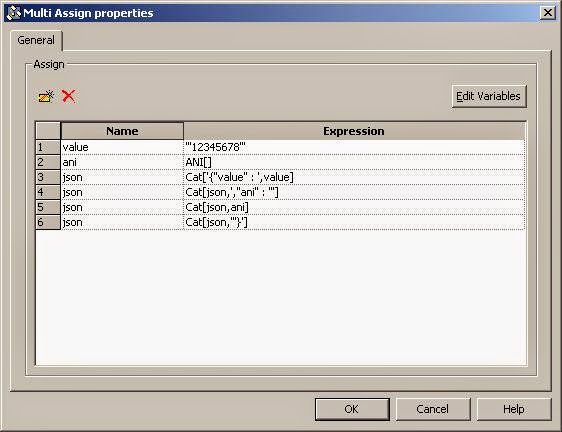
In Figure 2 I'm using a Multi-assign object to build up a JSON-formatted string that will be used as an input parameter to the POST call.  The resultant string looks like this:

{ "value" : '12345678', "ani" : '<the actual ANI of the inbound call to this strategy>' }

That string is assigned to a Genesys variable named 'json'.
Figure 2

Figure 3 shows the General Tab of the IRD web service object.  Here I'm setting up a HTTP POST call to a SSL-based REST service.  I explained how to configure Universal Routing Server (URS) for SSL access in this post.  The input parameter of this HTTP call will be sent as an application/json content type in the request body.

Figure 3

The Security tab of the web service object is depicted in Figure 4.  This tab sets up HTTP Basic Authentication for this POST call.  In this type of authentication credentials are passed in clear text, hence, by itself, basic authentication is inherently insecure.   However, combining basic auth with HTTPS does provide a fairly secure interface.  The authentication credentials are encrypted in TLS.

Figure 4

Finally, Figure 5 shows the Result tab of this web service object.  As was discussed in my previous post, Genesys URS will return the results of a web service call into an IRD List object.

Figure 5

In Figure 6, I pull the first item off this List object and assign it to an IRD variable called 'transferTarget'.  This web service call returns a JSON object with 3 properties.  The value of the first property of this JSON object is a phone number.  That phone number (now in the 'transferTarget' variable) is passed to a TRoute function which initiates a transfer.

Figure 6
As an aside - This strategy is loaded against a Genesys SIP Server (SIPS) route point.  You'll notice I have a "Silence" treatment object as the first object in this strategy.  That object is there to cause an 'answer' of the inbound call.  By answering the call (with either Genesys Media Server or Stream Manager), this subsequent transfer is implemented by SIPS as a SIP REFER.  If the call is never answered in the strategy (meaning no voice treatment of any sort), the transfer from the strategy is implemented as a re-INVITE, which keeps SIPS in the signalling path for the duration of the call - or - a 302 Moved, which is rejected by my SIP trunk service provider.  A REFER transfer takes SIPS out of the signalling path.  Whether a Re-INVITE or REFER/302 is initiated on the transfer is determined by how the oosp-transfer-enabled and refer-enable options are set on the Genesys trunk object used for the outbound transfer.

HTTP Delete Implementation

Figure 7 depicts a simple IRD strategy for illustrating a REST Delete operation.  This strategy accepts a call transferred from 3rd Party IVR, CTI framework, etc.  Based on ANI and DNIS, the strategy performs a fetch of the data associated with the call that was stored by the 3rd Party system.  The fetch is implemented as an HTTP Delete.  The Delete returns the data associated with the call and clears that data item from storage.

Figure 7
The first IRD object in this strategy (Multi-Assign) is depicted in Figure 8.  Here I'm building up a URL to the REST interface using string concats of the DNIS and ANI values of the inbound call.

Figure 8

The IRD Web Service object is shown in Figure 9.  The 'Web Service URL' parameter is set to the URL I built up in the previous step.  The 'Method' is set to DELETE.  Otherwise, this object is configured identically to the previous (Figure 3).

Figure 9

The remainder of this strategy is straight-forward.  The value fetched from the REST call is attached and then the call is routed to a skill.  The agent receives a screen-pop with that attached data item. Copyright ©1993-2024 Joey E Whelan, All rights reserved.

Sunday, September 14, 2014

CA-signed SSL Certificates with Node

Summary

I just recently went through the exercise of bringing up a Node HTTPS server with 'real' SSL credentials (meaning, not a self-signed certificate).  Although there's a lot of bits and pieces of info out there on the Interweb on how to obtain a CA-signed certificate, configure Node HTTPS, etc - I couldn't find a concise guide in any one place on how to do a real-world SSL implementation with Node.  Below is an attempt to provide clear guidance and hopefully save you some time if you ever have to configure this.

Step 1:  Generate a CSR
Below is the openSSL command to create a 2048-bit private key and certificate signing request (CSR - that will contain the corresponding public key).  That command will generate a series of questions for info required in a CSR. At a minimum, you'll need to provide a legitimate Common Name (a domain name you control) and email address.
openssl req -nodes -newkey rsa:2048 -keyout yourPrivate.key -out yourServer.csr


Step 2:  Submit the CSR to CA
I went with Comodo as my CA for this exercise.  They currently provide a 90-day free SSL certificate.  Additionally, I thought their cert request process was well-documented and easy to use. That request process amounted to a copy/paste of the text of the CSR to their web form and then proof that I actually controlled the domain in question.  That can be accomplished in multiple ways (email to the domain, CNAME mods, etc).  After Comodo has that proof, they'll send an email to you with a zip archive containing the following files:

  1. Certificate file.  Example:  yourDomain_com.crt
  2. Certificate chain file.  Example:  yourDomain_com.ca-bundle
Step 3:  Combine SSL Credentials into a PKCS #12 file
This is the part that took some time and digging to figure out.  Simply putting the credentials you've created/received into the HTTPS options on the createServer call doesn't cut it.  The problem is with that chain file.  It needs to be passed as an array for the 'ca' option.  That doesn't happen with just a fs.read.  You wind up with SSL errors when a client attempts to connect to a server with this config.


//WILL NOT WORK
var privateKey = fs.readFileSync('/path/to/yourPrivate.key');
var certificate = fs.readFileSync('/path/to/yourDomain_com.crt');
var certAuth = fs.readFileSync('/path/to/yourDomain_com.ca-bundle');
var credentials = {key: privateKey, cert: certificate, ca: certAuth};

var appHttps = express();
var httpsServer = https.createServer(credentials, appHttps).listen(yourHttpsPort);


Folks have written some examples on how to parse out that chain file into an array that Node can digest, but I ran across a post with a the better idea of just combining all three files into one PKCS file with the openSSL command below:

openssl pkcs12 -export -out yourDomain.com.pfx -inkey yourPrivate.key -in yourDomain_com.crt -certfile yourDomain_com.ca-bundle


Now, you can do the following:


//THIS WORKS
var pfxFile = fsys.readFileSync('/path/to/yourDomain.com.pfx');
var credentials = {pfx: pfxFile};
var appHttps = express();
var httpsServer = https.createServer(credentials, appHttps).listen(yourHttpsPort);
Copyright ©1993-2024 Joey E Whelan, All rights reserved.
Saturday, September 13, 2014

Enabling SSL for Genesys URS/HTTP Bridge

Summary

In this post I'm going to show how to get the Genesys Universal Routing Server (URS) HTTP Bridge capable of handling SSL connections.  The bridge is used to enable traditional Genesys routing strategies to access external SOAP or REST web services.  SSL integration is not well-documented in the product docs, so I'll save you some of my pain here (Linux deployment).


Environmentals

Firstly, you need to install the Genesys "Security Pack."  That software bundle isn't included with URS, but has the SSL libraries necessary for URS to access HTTPS-based web services.  After it is installed, you need to ensure the URS process has its LD_LIBRARY_PATH variable set to the directory where you put the Security Pack.  I made a shell script for starting up URS and added this command to it:

export LD_LIBRARY_PATH=$LD_LIBRARY_PATH:/opt/genesys/secpack

Now that URS can find its SSL libraries, now you need to tell it where to find its Certificate Authority (CA).  Interestingly enough, the product will actually trust a self-generated CA.  In any case, you have to set a URS configuration option that tells it where to go for that CA file.  Below is a screen-shot of the config option that needs to be set (def_trusted_ca).

Figure 1

And that's it.  Assuming you have a valid CA file, you should be able access HTTPS web services from a Genesys routing strategy with the above mods.
Copyright ©1993-2024 Joey E Whelan, All rights reserved.

Tuesday, August 19, 2014

Synchronization Constructs with Node + Redis

Summary

In this article I'll be describing how to create the following basic synchronization objects using a combination of Node and Redis:  semaphores, mutex locks, condition variables, and by a combination of locks and conditions - monitors.  I'll also include implementations of these objects in two classic computer science problems in concurrency.

Implementation of the Synchronization Objects

Given Node is a single-threaded architecture, the question arises - Why would I ever need to worry about concurrent programming problems like critical sections, mutual exclusion, synchronization, etc? Well, even if your code only involves one process, the asynchronous nature of Node can lead to situations where a shared object is being accessed in a non-coherent manner, i.e. race conditions.

There are no shared variables/memory in Node applications.  That includes even those apps with multiple processes utilizing the 'cluster' feature of Node.  That leads to use of objects external to Node to implement mutual exclusion and synchronization.  For this exercise, I used Redis.

Figure 1 depicts the overall approach I used.


Figure 1
Figure 2 depicts an overview of the Javascript object structure.

Figure 2
Synchronization Object Code Snippets

SyncConstruct - constructor
The constructor for this object creates Redis clients for command execution and subscription.  A callback map is also allocated to save callbacks for a waiting process.  A waiting process is 'awakened' when its Redis subscriber receives a message indicating it can proceed.  Its callback is fetched from the map and executed.

function syncConstruct(key, func)
{
    logger.debug('Entering - File: syncConstruct.js, Method: syncConstruct, key:%s', key);
    if (key && func)
    {
        var self = this;
        self.key = key;
        self.cbMap = {};  //object map containing the callback functions of processes waiting to execute
        self.client = redis.createClient(properties.redisServer.port, properties.redisServer.host);  //redis command client
        self.subscriber = redis.createClient(properties.redisServer.port, properties.redisServer.host);  //redis subscription client
        var channel = self.key + ':' + os.hostname() + ':' + process.pid;
        
        self.subscriber.subscribe(channel);
        
        
        /*
         * When a process that was queued due to synchronization delay, it is 'signal'ed to resume via a redis publication.  The
         * 'on message' event triggers execution of the delayed process's callback function
         */
        self.subscriber.on('message', function(channel, msg){
            logger.debug('Entering - File: syncConstruct.js, Method: on message, channel: %s, pid: %d', channel, process.pid);
            var cbFunc = self.cbMap.channel;
            delete self.cbMap.channel;
            cbFunc();
            logger.debug('Exiting - File: syncConstruct.js, Method: on message channel: %s, pid: %d', channel, process.pid);
        });
        
        /*
         * Constructor callback is invoked upon receipt of the 'subscribe' event.  
         */
        self.subscriber.on('subscribe', function(channel, count){
            logger.debug('Entering - File: syncConstruct.js, Method: on subscribe, channel: %s, pid: %d', channel, process.pid);
            func();
            logger.debug('Exiting - File: syncConstruct.js, Method: on subscribe, channel: %s, pid: %d', channel, process.pid);
        });
        
    }
    logger.debug('Exiting - File: syncConstruct.js, Method: syncConstruct');
};


SyncConstruct - enter
This provides the base method for critical section entry used by all the inherited objects (semaphore, etc).  This method executes the particular Redis Lua Script for that inherited object.  The process is either allowed to continue or is delayed by placing its callback on the wait queue (implemented as a Redis List object).

syncConstruct.prototype.enter = function(luaScript, callback1, callback2)
{
    
    var self = this;
    var channel = self.key + ':' + os.hostname() + ':' + process.pid;
    logger.debug('Entering - File: syncConstruct.js, Method: enter, channel: %s', channel);
    self.cbMap.channel = callback1;
   
    self.client.eval(luaScript, 2, self.key, self.key + ':WaitQueue', channel, function (err, res){
        if (err)
        {
            throw err;
        }
            
        if (res > 0)  //will never be true for a condition variable wait method call
        {
            logger.debug('File: syncConstruct.js, Method: enter, passed eval script, res: %s, channel: %s, pid: %d', 
                    res, channel, process.pid);
            var func = self.cbMap.channel;
            
            if (func) 
            {
                delete self.cbMap.channel;
                func();
            }
        }
        
        if (callback2)  //covers the case of releasing a monitor lock after a process has been put in the wait queue
            callback2();
    });
    logger.debug('Exiting - File: syncConstruct.js, Method: enter, channel: %s', channel);
};


SyncConstruct - exit
Base method for critical section exit.  It evaluates a Redis Lua script passed as a parameter.  For all inherited objects, that script ensure 'fairness' by choosing an already waiting process as next in queue.  If there are no processes in the wait queue, the synchronization object (Redis key) is updated to reflect the critical section is available.

syncConstruct.prototype.exit = function(luaScript, callback)
{
    var self = this;
    logger.debug('Entering - File: syncConstruct.js, Method: exit, self.key: %s, queue: %s', self.key, self.key+':WaitQueue');
    self.client.eval(luaScript, 2, self.key, self.key + ':WaitQueue', function (err, res){
        if (err)
        {
            throw err;
        }
      
        if (res > 0)  
        {
            if (callback)
                callback();
        }
        else  //covers the case that a message is published but no process received it (process died for example)
        {
            logger.error('***File: syncConstruct.js, Method: exit, no process received published message to %s', self.key+':WaitQueue');
            self.exit(luaScript, callback);
        }
    });
    logger.debug('Exiting - File: syncConstruct.js, Method: exit');
};


Semaphore - script to implement the "P" function
This Lua script is called by an Redis eval method.  The script checks the value of a Redis key.  If that key is greater than 0, it decrements the key and returns the key's previous value (something > 0).  If the key is 0, the process's id is pushed on to a Redis list (wait queue) and 0 is returned.

The decision to allow the process to proceed is based on the return value.  Greater than 0, the process proceeds.  Less than or equal 0, the process delays.

var pScript =  'local s = redis.call(\'get\', KEYS[1])\
                if (s and s + 0 > 0) then \
                    redis.call(\'decr\', KEYS[1]) \
                    return s \
                else \
                    redis.call(\'lpush\',KEYS[2], ARGV[1]) \
                    return 0 \
                end';


Semaphore - script to implement the "V" function
This Lua script checks the Redis list representing the wait queue by popping off the rightmost (oldest) member.  If a process was on that queue, a message is published to its specific channel (which is identified by a concatenation of the key name, machine name, and process id.  If nothing was on the wait queue, the Redis key is simply incremented.

var vScript =  'local pId = redis.call(\'rpop\', KEYS[2]) \
                if (pId) then \
                    return redis.call(\'publish\', pId, \'V\') \
                else \
                    return redis.call(\'incr\', KEYS[1]) \
                end';


Lock - script to implement the "acquire" function
This script fetches the Redis key associated with the lock and checks if it is greater than 0.  If so, the key is decremented and the previous value returned (value greater than 0 which allows the process to proceed).  If not, the process is pushed onto the FIFO wait queue.

var acquireScript =  'local s = redis.call(\'get\', KEYS[1]) \
                      if (s and s + 0 > 0) then \
                         redis.call(\'decr\', KEYS[1]) \
                         return s \
                      else \
                         redis.call(\'lpush\',KEYS[2], ARGV[1]) \
                         return 0 \
                      end';

Lock - script to implement the "release" function
This script checks the wait queue for a waiting process.  If one exists, that process is awakened via a published message.  If not, the Redis key associated with the lock is incremented to at most a value of 1.
var releaseScript =  'local pId = redis.call(\'rpop\', KEYS[2]) \
                     if (pId) then \
                        return redis.call(\'publish\', pId, \'release\') \
                     else \
                        local s = redis.call(\'get\', KEYS[1]) + 0 \
                        if (s and s + 0 < 1) then \
                            return redis.call(\'incr\', KEYS[1]) \
                        else \
                            return 1 \
                        end \
                     end';


Condition - script to implement the "wait" function
For condition variables, the entry procedure is very simple:  the process is put immediately onto the wait queue.

var waitScript = 'redis.call(\'lpush\',KEYS[2], ARGV[1]) \
                  return 0';


Condition - script to implement the "signal" function
Script to implement the signal function is equally simple for condition variables.  The wait queue is 'popped'.  If a process was waiting, a message to proceed to published to it.


var signalScript = 'local pId = redis.call(\'rpop\', KEYS[2]) \
                    if (pId) then \
                       return redis.call(\'publish\', pId, \'signal\') \
                    else \
                       return 1 \
                    end';


Condition - script to implement the "signalAll" function
Nearly identical to the above script.  In this case, the entire wait queue is popped and every waiting process is sent a message to proceed. 


var signalAllScript = 'local pId = redis.call(\'rpop\', KEYS[2]) \
                        while (pId) do \
                            redis.call(\'publish\', pId, \'signalAll\')\
                            pId = redis.call(\'rpop\', KEYS[2]) \
                        end \
                        return 1';


Synchronization Implementation #1 - The Dining Philosophers Problem

Dining Philosophers is a classic synchronization problem in computer science.  The gist of the problem is that multiple processes (Philosophers) are competing for insufficient resources (Forks).  If all processes were to acquire and hold 1 resource at the same time , none would be able to proceed (a Philosopher needs 2 forks to eat). Deadlock occurs, or more precisely for this case - all the Philosophers starve to death.

I implemented the solution to this problem using Semaphores.  Each of the 5 forks becomes a semaphore that each of the 5 philosopher processes perform P and V ops for access synchronization.

Figure 3 depicts the organization of the main process flow of the solution.


Figure 3


Below is a code snippet of that flow above.  Async was used to minimize callback nesting.

    async.series([ function (callback1)
                   {    
                        rightFork = new semaphore(rightForkNum, callback1);
                   },
                   function (callback2)
                   {
                       leftFork = new semaphore(leftForkNum, callback2);
                   },
                   function (callback3)
                   {
                       /*
                        * after semaphores have been created, do 10 iterations of getting forks, eating, and thinking
                        */
                       var iteration = 1;
                       d.run(function() {
                           async.whilst(
                                   function() 
                                   { 
                                       return iteration <= 10;
                                   },
                                   function(callback) 
                                   {
                                       logger.info('Iteration %d, Philosopher %d', iteration, cluster.worker.id);
                                       iteration++;
                                       live(rightFork, leftFork, callback);
                                   },
                                   function (err) 
                                   {
                                       if (err)
                                           throw err;
                                       logger.info('Philosopher %d signing off', cluster.worker.id);
                                       rightFork.quit();
                                       leftFork.quit();
                                       logger.debug('Exiting - File: dining.js, Method: initDomain, Philosopher id:%d', cluster.worker.id);
                                       callback3();
                                   }
                           );
                       });
                   }
                  ],
                  function(err)
                  {
                    if (err)
                        throw err;
                    cluster.worker.disconnect();
                  }
    );


Synchronization Implementation #2 - Readers/Writers Problem

Readers/Writers is yet another classic computer science problem.  For this synchronization problem, we have multiple read and write processes competing for the same resource (file, database, etc).  Multiple readers can access the resource concurrently (if there are no writers accessing), but a writer must have exclusive access.

I implemented this solution utilizing monitors.  I used a lock to ensure mutual exclusion to the monitor state, condition variables for process synchronization, and shared variables (Redis keys) for monitor state.

Figure 4 depicts the main process flow for the reader process.
Figure 4
Figure 5 depicts the main process flow for the writer process.
Figure 5

Below is a code snippet of the reader process.  Again, async is used to keep the callback nesting manageable.

    async.series(
                 [function(callback1)
                  {
                      logger.info('Reader %d attempting to gain read access', process.pid); 
                      var writers = 1;
                      async.whilst(  //loop until read access is available
                              function()
                              {
                                  return writers > 0;
                              },
                              function(cb1)
                              {
                                  mutex.acquire(function() {  //acquire monitor lock
                                      numWriters.get(function(res1) {  //fetch numWriters shared variable
                                          writers = res1;
                                          if (res1 == 0)  // if no writers are active, increment the numReaders shared var and release monitor lock
                                          {
                                              numReaders.incr(function(res2) {
                                                  mutex.release(function(){
                                                      cb1();
                                                  });
                                              }); 
                                          }
                                          else  //writers are active, wait on the okToRead cond var and release monitor lock
                                          {
                                              okToRead.wait(mutex, cb1);
                                          }
                                      });
                                  });
                              },
                              function(err)
                              {  
                                  if (err)
                                      throw err;
                                  callback1();  //writers was 0, reader gained access, exiting loop
                              }
                      );
                  },
                  function(callback2) 
                  {
                      logger.info('Reader %d gained read access', process.pid);
                      var readTime = utilities.randomPause(1,3); //1 to 3 seconds of simulated reading
                      setTimeout(function(){ logger.info('Reader %d finished reading', process.pid); callback2(); }, readTime);
                  },
                  function(callback3) 
                  {
                      logger.info('Reader %d releasing read access', process.pid);
                      mutex.acquire(function(){  //acquire monitor lock for the purpose of releasing a reader
                          numReaders.decr(function(res){  //decrement number of readers
                              if (res == 0)  // if num of readers is 0, signal a waiting writer
                              {
                                  okToWrite.signal(function(){
                                      mutex.release(function(){  //release monitor lock
                                         callback3(); //return
                                      });
                                  });
                              }
                              else  //num readers > 0, so just release the monitor lock and return
                              {  
                                  mutex.release(function(){ callback3();});
                              }
                          });
                      });
                  },
                  function(callback4)
                  {
                      logger.info('Reader %d processing data', process.pid);
                      var processingTime = utilities.randomPause(3,8);  //3 to 8 seconds of simulated data processing time
                      setTimeout(function(){ callback4(); }, processingTime);
                  }
                  ], 
                  function(err)
                  {
                     if (err)
                         throw err;
                     logger.debug('Exiting - File: readersWriters.js, Method: read, Process id:%d', process.pid);
                     readCB();
                  }
             );


Finally, code snippet of the writer process.

    async.series(
            [function(callback1)
             {
                 logger.info('Writer %d attempting to gain write access', process.pid); 
                 var writers = 1;
                 var readers = 1;
                 async.whilst(  //loop until write access is available, meaning - no readers or writers active
                         function()
                         {
                             return readers > 0 || writers > 0;
                         },
                         function(cb1)
                         {
                             mutex.acquire(function() {  //acquire monitor lock
                                 numReaders.get(function(res1){ //fetch numReaders shared variable
                                     readers = res1;
                                     if (res1 == 0)  //if no readers active, check number of writers
                                     {
                                         numWriters.get(function(res2){
                                             writers = res2;
                                             if (res2 == 0)  //if no writers active as well, increment numWriters and release monitor lock
                                             {
                                                 numWriters.incr(function(res3){
                                                     mutex.release(function(){
                                                         cb1();
                                                     });
                                                 });
                                             }
                                             else  //active writers are present, release monitor lock and wait
                                                 okToWrite.wait(mutex, cb1);
                                         });
                                     }
                                     else  //active readers are present, release monitor lock and wait
                                         okToWrite.wait(mutex, cb1);
                                 });
                             });
                         },
                         function(err)
                         {  
                             if (err)
                                 throw err;
                             callback1();  //number of readers and writers was 0, writer gained access, exiting loop
                         }
                 );
             },
             function(callback2) 
             {
                 logger.info('Writer %d gained write access', process.pid);
                 var writeTime = utilities.randomPause(1,3); //1 to 3 seconds of simulated wriing
                 setTimeout(function(){ logger.info('Writer %d finished writing', process.pid); callback2(); }, writeTime);
             },
             function(callback3) 
             {
                 logger.info('Writer %d releasing write access', process.pid);
                 mutex.acquire(function(){  //acquire monitor lock for the purpose of releasing a writer
                     numWriters.decr(function(res){  //decrement number of writers
                         okToWrite.signal(function(){  //signal 1 waiting writer
                             okToRead.signalAll(function(){  //signal all waiting readers
                                 mutex.release(function(){
                                     callback3();
                                 });
                             });
                         });
                     });    
                 });
             },
             function(callback4)
             {
                 logger.info('Writer %d processing data', process.pid);
                 var processingTime = utilities.randomPause(3,8);  //3 to 8 seconds of simulated data processing time
                 setTimeout(function(){ callback4(); }, processingTime);
             }], 
             function(err)
             {
                if (err)
                    throw err;
                logger.debug('Exiting - File: readersWriters.js, Method: write, Process id:%d', process.pid);
                writeCB();
             }
        );
Lessons Learned
  1. Developing process synchronization/mutex objects by hand is non-trivial.
  2. Process synchronization in an asynchronous environment (Node) becomes complex quickly.
  3. Attempting to use Redis publisher/subscriber in conjunction with standard Redis key/value objects is prone to race conditions if not carefully thought through.

Full Source Code here.
Copyright ©1993-2024 Joey E Whelan, All rights reserved.

Friday, July 18, 2014

Deriving ACL Wildcard Masks

The topic of ACL masks comes up when you're trying to put together firewall rules.  I'm going to show a semi real-world example at the binary level.  There are plenty of short-cuts/tricks out there to do this but I figure if you understand the low-level method - you can understand the short-cuts.

Scenario

I need to add a firewall rule to allow RTP from a service provider that operates servers in the subnet of 172.28.0.0/14 (non-routable/RFC 1918 range for example purposes only).

Step 1:  Convert the CIDR notation to a subnet mask.

Rewriting 172.28.0.0 into 8-bit quads yields:  10101100.00011100.00000000.0000000

The /14 indicates that the first 14 bits are used as the network prefix (remainder are the host prefix bits).  Network bits highlighted below.

10101100.00011100.00000000.00000000

The subnet mask is obtained by setting each of those 14 bits to 1.  This yields:

11111111.11111100.00000000.00000000, or 255.252.0.0


Step 2:  Convert the subnet mask to an ACL wildcard mask.

Once the subnet mask is obtained, obtaining the ACL wildcard is a simple matter of inverting all 32 bits of the subnet mask (flip 0's to 1's, 1's to 0's).  This yields:

00000000.00000011.11111111.11111111, or 0.3.255.255

Step 3:  Construct the ACL entry.

In this example RTP traffic will be sourced from the following UDP port range:  16384 - 32767.  I use a non-sensical host ip address (1.1.1.1) as the destination, as an example.


router(config)#ip access-list extended rtpACL
router(config-ext-nacl)#10 permit udp 172.28.0.0 0.3.255.255 range 16384 32767 host 1.1.1.1
router(config-ext-nacl)#exit
Copyright ©1993-2024 Joey E Whelan, All rights reserved.

Thursday, May 29, 2014

Distributed Job Scheduling with Redis/Node.js

Summary
I'll be discussing a distributed job scheduling implementation utilizing Node.js as the application engine and Redis for the underlying data structures.

In this implementation, I'll be using an event-driven model (no polling) with a separate Dispatcher process for assigning workers to jobs.  Events are announced via the Redis publisher/subscriber model.  Available job and worker queues are realized via Redis Lists.

Implementation

Figure 1 below depicts my overall approach for this application.
  • Test Runner - Node.js application to kick-off a job generator process.  Jobs are generated at a configurable rate.
  • Job Generator - Node.js  application that inserts jobs into the available job queue and notifies the Dispatcher of the available job.
  • Redis - provides the shared data structures and pub/sub mechanism for notifications.
  • Dispatcher - Node.js application that assigns available workers to jobs.
  • Worker - Node.js application that simulates working on a job.
Figure 1

Figure 2 below depicts the data structures and overall flow of this application.  Redis List structures are used for FIFO queuing.

Figure 2

Code Snippets

main.js - This is the hub of the application.  Node's cluster mechanism is used to create a single dispatcher process and (#CPU's - 1) worker processes.   Each worker is assigned a name that equates to their host machine name and process id on that host.  Various internal counters and data structures are reset on start up (jobId, jobQueue, etc).  Node domains are used for resilience.

var cluster = require('cluster');
var domain = require('domain');
var redis = require('redis');
var os = require('os');
var logger = require('./logger');
var timestamper = require('./timeStamper');
var worker = require('./worker');
var dispatcher = require('./dispatcher');
var utilities = require('./utilities');
var properties = require('./properties');
var numProcesses = os.cpus().length;

if (cluster.isMaster)
{
 
    var client = redis.createClient(properties.redisServer.port, properties.redisServer.host);
    var multi = client.multi();
    multi.del('start');
    multi.del('jobId');
    multi.del('jobQueue');
    multi.del('workerQueue');
    multi.exec(function (err, res){
        if (err)
            throw err;
        cluster.fork({processType : 'dispatcher'});
        numProcesses--;
     
        do
        {
            cluster.fork({processType : 'worker'});
            numProcesses--;
        }
        while (numProcesses > 0);
        multi.quit();
        client.quit();
    });
 
cluster.on('disconnect', function(worker) {  //process died
logger.error('File: main.js, Worker %d died', worker.process.pid);
});
}
else
{
    logger.debug('File: main.js, ProcessType %s launched', process.env.processType);
    initDomain(process.env.processType);
}


function initDomain(processType)
{
    logger.debug('Entering - File: main.js, Method: initDomain, processType:%s, pid:%d', processType, process.pid);
    var d = domain.create();
    var client = redis.createClient(properties.redisServer.port, properties.redisServer.host);
    var subscriber = redis.createClient(properties.redisServer.port, properties.redisServer.host);
 
    d.on('error', function (err) {
        try
        {
            logger.error('Crash: ' + err.message);
            var killtimer = setTimeout(function() {process.exit(1);}, 10000);
            killtimer.unref();
         
            client.quit();
            subscriber.quit();
            cluster.worker.disconnect();
        }
        catch (exc)
        {
            console.log(timestamper() + 'Error encountered during crash recovery: ' + exc.message);
        }
    });
 
    switch (processType)
    {
        case 'dispatcher':
            d.run(function() {
                new dispatcher(client, subscriber).start();
            });
            break;
   
        case 'worker':
            d.run(function() {
                new worker(os.hostname() + ':' + process.pid, client, subscriber).start();
            });
            break;
    }
 
    logger.debug('Exiting - File: main.js, Method: initDomain, processType:%s', processType);

};


worker.js - Below is the start up code for a worker.  A worker uses two Redis client connections: a general-use connection and a second connection dedicated for messaging via pub/sub.

worker.prototype.start = function()
{
    logger.debug('Entering - File: worker.js, Method: start, workerId:%s', this.workerId);
 
    var that = this;
 
    this.client.on('error', function (err){
        logger.error('File: worker.js, Method: start, redis client error: ' + err.message);
        throw err;
    });
    this.subscriber.on('error', function (err){
        logger.error('File: worker.js, Method: start, subscriber client error: ' + err.message);
        throw err;
    });
 
    this.subscriber.subscribe(this.workerId);  //subscribe to a message channel specific to this worker
 
    this.subscriber.on('subscribe', function(channel, count){
        setWorkerAvailable(that.client, that.workerId);
    });
 
    this.subscriber.on('message', function(channel, msg){
        logger.debug('worker %s received job %s', that.workerId, msg);
        doWork(msg, function(){
                setWorkerAvailable(that.client, that.workerId);
                if (msg == properties.numJobs)
                {
                    that.client.get('start', function (err, res){
                        var duration = new Date().getTime() - res;
                        logger.debug('*****duration(ms): ' + duration);
                    });
                }
        });
    });
 
    logger.debug('Exiting - File: worker.js, Method: start, workerId:%s', this.workerId);
};


function setWorkerAvailable(client, workerId)
{
    logger.debug('Entering - File: worker.js, Method: setWorkerAvailable, workerId: %s', workerId);
    
    client.lpush('workerQueue', workerId, function (err, res){
        if (err)
        {
            logger.error('File: worker.js, Method: setWorkerAvailable, client.lpush error: ' + err.message);
            throw err;
        }
        
        utils.notifyDispatcher(client, JSON.stringify({'type' : 'worker', 'id' : workerId}));
    });
    logger.debug('Exiting - File: worker.js, Method: setWorkerAvailable, workerId: %s', workerId);

};

dispatcher.js - The dispatcher process provides the 'brains' of the operation.  It listens for job/worker events and then assigns jobs to available workers, first come - first serve.  A Lua script is used to ensure atomicity of the job/worker assignment step.

var dispatchScript = 'local jobQueueLen = redis.call(\'llen\', KEYS[1]) \
                      local workerQueueLen = redis.call(\'llen\', KEYS[2]) \
                      if (jobQueueLen > 0 and workerQueueLen > 0) then \
                        local job = redis.call(\'rpop\', KEYS[1]) \
                        local worker = redis.call(\'rpop\', KEYS[2]) \
                        return {job, worker} \
                      else \
                        return nil \
                      end';

function messageHandler(client, msg)
{
    logger.debug('Entering - File: dispatcher.js, Method: messageHandler');
    client.eval(dispatchScript, 2, 'jobQueue', 'workerQueue', function (err, res){
        if (err)
        {
            logger.error('File: dispatcher.js, Method: messageHandler, redis eval error: ' + err.message);
            throw err;
        }
        if (res && res.length == 2)
            notifyWorker(client, res[0], res[1]);
    });
    logger.debug('Exiting - File: dispatcher.js, Method: messageHandler');
}; 


generator.js - This process simulates job insertions into the job queue.  It notifies the dispatcher accordingly when a job has become available.

generator.prototype.generate = function()
{
    logger.debug('Entering - File: generator.js, Method: generate');
 
    var that = this;
 
    that.client.incr('jobId', function (err1, jobId){
        if (err1)
        {
            logger.error('File: generator.js, Method: generate, client.incr error: ' + err1.message);
            throw err1;
        }
     
     
        that.client.lpush('jobQueue', jobId, function(err2, res){
            if (err2)
            {
                logger.error('File: generator.js, Method: generate, client.lpush error: ' + err2.message);
                throw err2;
            }
            logger.debug('File: generator.js, Method: generate, jobId %d placed on queue', jobId);
            utils.notifyDispatcher(that.client, JSON.stringify({'type' : 'job', 'id' : jobId}));
        });
    });
 
    logger.debug('Exiting - File: generator.js, Method: generate');
}; 


utilities.js - This code provides a common mechanism for the worker and generator processes to notify the dispatcher of available jobs and/or workers.  A Lua script is used to optimize (and atomize) the dispatcher notification such that a broadcast only goes out if there is at least 1 job and 1 worker currently available.

var notifyScript = 'local jobQueueLen = redis.call(\'llen\', KEYS[1]) \
                    local workerQueueLen = redis.call(\'llen\', KEYS[2]) \
                    if (jobQueueLen > 0 and workerQueueLen > 0) then \
                        return redis.call(\'publish\', KEYS[3], ARGV[1]) \
                    else \
                        return -1 \
                    end';

utilities.notifyDispatcher = function(client, msg)
{
    logger.debug('Entering - File: utilities.js, Method: notifyDispatcher, msg: %s', msg);
    client.eval(notifyScript, 3, 'jobQueue', 'workerQueue', 'queueMessages', msg, function (err, res){
        if (err)
        {
            logger.error('File: utilities.js, Method: notifyDispatcher, client.eval error: ' + err.message);
            throw err;
        }
     
        logger.debug('File: utilities.js, Method: notifyDispatcher, client eval res:' + res);
        if (res == 0)  //resend 1 second later if no Dispatcher received the message
        {
            setTimeout(function(){ utilities.notifyDispatcher(client, msg);}, 1000);
        }
    });
 
    logger.debug('Exiting - File: utilities.js, Method: notifyDispatcher, msg: %s', msg);
};

Copyright ©1993-2024 Joey E Whelan, All rights reserved.