Saturday, December 12, 2020

API Testing

Summary

I'll be discussing various methods for testing an API in this post.  This will include the usage of the AWS Distributed Load Testing tool.

Test Architecture

Below is the overall test architecture.  The left side represents various methods for System/QA type testing.  The right side represents a load testing option.


Web Services

Diagram below of the notional REST API system to be tested.  The scenario here is a service that tracks hit counts for web pages.


API Schema

Screen-shot of the OpenAPI schema created in Swagger's editor.


Server Snippet

A snippet of the 'create' service below.
//create
app.post('/page', (req, res) => {
    logger.debug('post request received');
    const pageId = req.body.pageId;
    if (pageId) {
        if (pageId in hitCounter) {
            res.status(400).json({error : 'page already exists'});
        }
        else {
            hitCounter[pageId] = 1;
            res.status(201).json({'pageId': pageId, 'hitCount': hitCounter[pageId]});
        }
    }
    else {
        res.status(400).json({error : 'missing pageId'});
    }
});


cURL Test Client

cURL 'create' command line and output below.
echo '***CREATE***'
curl -i -w "\n%{time_total} sec" -H "Content-Type: application/json" -d '{"pageId":"testpage"}' http://localhost:8888/page
echo '\n************\n'
***CREATE***
HTTP/1.1 201 Created
X-Powered-By: Express
Content-Type: application/json; charset=utf-8
Content-Length: 34
ETag: W/"22-2+hqei/ocIIynyLdm2zE/SJrQ/Q"
Date: Sun, 13 Dec 2020 00:45:57 GMT
Connection: keep-alive

{"pageId":"testpage","hitCount":1}
0.024595 sec
************


Custom Test Client

Custom nodejs client for the same 'create' endpoint.

async function createTest(url, body) {
    console.log(`Create Test: ${url}, ${JSON.stringify(body)}`);

    const start = Date.now();
    const response = await fetch(url, {
        method: 'POST',
        body: JSON.stringify(body),
        headers: {'Content-Type': 'application/json'}
    });
    const finish = Date.now();
    const respTime = finish - start;

    let result;
    try {
        result = JSON.stringify(await response.json());
    }
    catch (err) {
        result = err;
    }
    console.log(`Response status: ${response.status}`);
    console.log(`Response value: ${result}`);
    console.log(`Response time: ${respTime} ms`);
    console.log('****************');
}
Create Test: http://localhost:8888/page, {"pageId":"testpage"}
Response status: 201
Response value: {"pageId":"testpage","hitCount":1}
Response time: 39 ms
****************


Postman Test Client

This client can be automatically created by importing the OpenAPI 3.0 schema.


Load Testing

AWS has a pre-built architecture for generating load on REST clients here.  Screenshots of the build and execution of that tool.


Source


Copyright ©1993-2024 Joey E Whelan, All rights reserved.

Sunday, November 22, 2020

Google Document AI

Summary

This post is a continuation of the previous on Google Cloud Functions and intake of attachments in email.  In this post, I'll extend what was done previously with the Document AI and Natural Language (NL)APIs.  In particular, I'll be parsing a notional Return Merchandise Authorization (RMA) pdf with the Document AI to find a field that will determine what the appropriate human skill set is necessary for further processing.  Additionally, I'll use the Sentiment function within NL to determine if the RMA requires special processing - i.e., an unhappy customer that requires special handling.

Part 2:  Google Document AI

Architecture


Example Form Input

This is a screen-shot of the PDF that is used for the input for this example.

Code Snippet - GCF Storage Trigger

This code gets called when the PDF is uploaded to Cloud Storage by the email handling GCF discussed in the previous post.
exports.processRma = async (event, context, callback) => {
  try {
    await processForm(event); 
  }
  catch(err) {
    console.error(err);
  }
  finally {
    callback();
  }
};

Code Snippet - Main Function (processForm)

    const formFields = await parseForm(file);
    let disposition = {};
    let choice;
    let sentiment;

    for (const field of formFields) {
        const fieldName = field.fieldName.trim();
        switch(fieldName) {
            case 'Credit or Replace:':
                choice = field.fieldValue.trim().toLowerCase(); 
                console.log(`choice: ${choice}`);
                break;
            case 'Comments:':
                sentiment = await getSentiment(field.fieldValue.trim());
                console.log(`sentiment: ${sentiment}`);
                break;
            default:
                ;
                break;
        } 
    }
    if (sentiment < 0) {
        disposition.skill = 'ADVOCATE';
    }
    else if (choice === 'replace') {
        disposition.skill = 'REPLACE';
    }
    else {
        disposition.skill = 'CREDIT';
    }
    
    const folder = file.name.split('/')[0];
    disposition.signedUrl = await moveFile(gcsObj.bucket, folder, file);
    disposition.timestamp = await routeDisposition(disposition);
    await writeDisposition(folder, disposition);
    return disposition;

Results

Cloud Log

Note that Document AI parsed out that this was a credit request.  Also, note the negative sentiment calculated on the Comments field.


Cloud Storage End State


Disposition JSON File

Note the required skill was updated to 'ADVOCATE' from 'CREDIT' due to the negative comments.
{
"skill":"ADVOCATE",
"signedUrl":"https://storage.googleapis.com/rma-processed/501289c9-f39a-4b51-a60e-2246..",
"timestamp":"Mon, 23 Nov 2020 15:18:29 GMT"
}

Copyright ©1993-2024 Joey E Whelan, All rights reserved.

Saturday, November 14, 2020

Inbound Email Handling with Google Cloud Functions

Summary

This post covers the intake of emails w/attachments into Google Cloud Functions (GCF).  The code here covers storing those attachments into a Cloud bucket.

There is no native SMTP trigger for GCF, so a 3rd party needs to be used to convert the email to an HTTP POST that can subsequently trigger a GCF.  In this case, I used CloudMailin.  They have a nice interface and are developer-friendly.  The GCF then needs to process the multipart form data and write the file attachments to Cloud Storage.

Part 1:  Inbound Email Handling with Google Cloud Functions

Architecture


Code Snippet - GCF Trigger

exports.uploadRma = (req, res) => {
	if (req.method === 'POST') {
		if (req.query.key === process.env.API_KEY) {  
			upload(req)
			.then(() => {
				res.status(200).send('');

Code Snippet - Upload function

The Busboy module is leveraged to do the heavy lifting of parsing the multi-part form.  Each file is written to a UUID "folder" in Cloud Storage.  Those writes are stored in a Promise array that is resolved when all the attachments of the form have been parsed.

		const busboy = new Busboy({headers: req.headers});
		const writes = [];
		const folder = uuidv4() + '/'; 

		busboy.on('file', (fieldname, file, filename, encoding, mimetype) => {
			console.log(`File received: ${filename}`);
			writes.push(save(folder + filename, file));
		});

		busboy.on('finish', async () => {
			console.log('Form parsed');
			await Promise.all(writes);
			resolve();
		});

		busboy.end(req.rawBody);

Code Snippet - Save function

A read stream for the file attachment is piped to a write stream to Cloud Storage.
function save(name, file) {	
	return new Promise((resolve, reject) => {
		file.pipe(bucket.file(name).createWriteStream())
		.on('error', reject)
		.on('finish', resolve);
	});
}

Results

Original Email


Cloud Logs


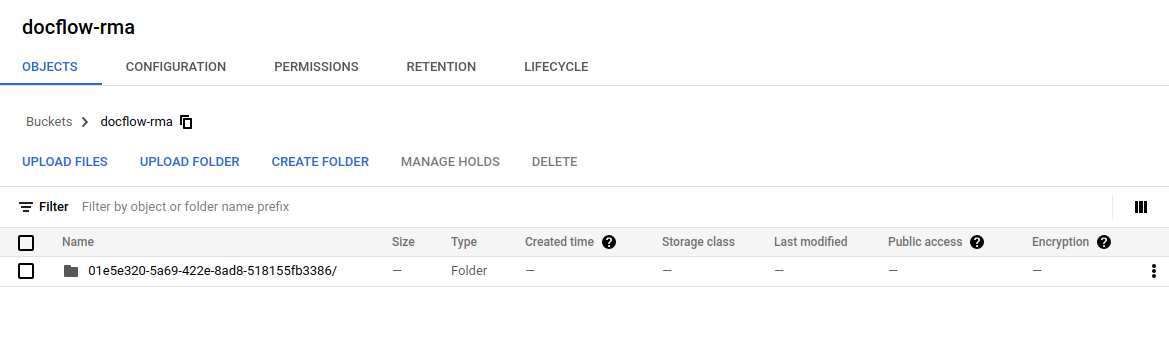
Cloud Storage


Source


Copyright ©1993-2024 Joey E Whelan, All rights reserved.

Friday, November 6, 2020

Google Cloud Functions and CORS

 Summary

In this post, I'll dig into a common problem faced by developers:  Same-origin policy. A relaxation of that policy is known as Cross-origin Resource Sharing (CORS).  I'm going to focus on the challenges with CORS in the Google Cloud environment. 

Architecture

Below is the test environment I'll be using for the following four different scenarios:
  • Scenario 1:  Publicly-accessible (no authentication) Cloud Function call with no CORS support from a Cloud Storage hosted static website.
  • Scenario 2:  Public Cloud Function call with CORS support from the static website.
  • Scenario 3:  Private Cloud Function call (authentication required) with CORS support from the static website.
  • Scenario 4:  Proxied Cloud Function call to a private Cloud Function.  Proxy function is publically accessible and provides CORS support.

Scenario 1:  Public Function, No CORS Support

Cloud Function

exports.pubGcfNoCors = (req, res) => {
	res.set('Content-Type', 'application/json');
	let result;

	switch (req.method) {
		case 'POST':
			result = {
				result: 'POST processed'
			};
        	res.status(201).json(result);
			break;
		case 'GET' :
			result = {
				result: 'GET processed'
			};
        	res.status(200).json(result);
			break;
		case 'PUT' :
			result = {
				result: 'PUT processed'
			};
			res.status(200).json(result);
			break;
		case 'DELETE' :
			result = {
				result: 'DELETE processed'
			};
			res.status(200).json(result);
			break;
		default:
			res.status(405).send(`${req.method} not supported`);
	} 
};

CURL Output 

Success.  The function performs as expected from a CURL call.
$ curl https://us-west3-corstest-294418.cloudfunctions.net/pubGcfNoCors
{"result":"GET processed"}

Web Page (static HTML)

This static website is hosted on the domain corstest.sysint.club.  Line 16 below performs a fetch to a website outside of that domain (cloud function).  This sets up the same-origin conflict.
<!DOCTYPE html>
<html>

<head>
    <title>Google Cloud Function CORS Demo</title>
    <meta charset="UTF-8">
</head>

<body>

<h1>Public Google Cloud Function, No CORS Support</h1>

<input type="button" id="gcf" onclick="gcf()" value="Call GCF">
<script>
  async function gcf() {
    const url = 'https://us-west3-corstest-294418.cloudfunctions.net/pubGcfNoCors';
    const response = await fetch(url, {
      method: 'GET'
    });
    console.log('response status: ' + response.status);
    if (response.ok) {
      let json = await response.json();
      console.log('response: ' + JSON.stringify(json));
    }
  }
</script>
</body>

</html>

Browser Output

Fail.  Below is the expected results when the function is called:  same-origin conflict triggers the browser to prevent the fetch to the cloud function:

Scenario 2:  Public Function with CORS Support

Cloud Function

Line 3 provides the critical header necessary to allow the function call to be executed in a browser environment.
exports.pubGcfCors = (req, res) => {
	res.set('Content-Type', 'application/json');
	res.set('Access-Control-Allow-Origin', 'http://corstest.sysint.club');
	let result;

	switch (req.method) {
		case 'POST':
			result = {
				result: 'POST processed'
			};
        	res.status(201).json(result);
			break;
		case 'GET' :
			result = {
				result: 'GET processed'
			};
        	res.status(200).json(result);
			break;
		case 'PUT' :
			result = {
				result: 'PUT processed'
			};
			res.status(200).json(result);
			break;
		case 'DELETE' :
			result = {
				result: 'DELETE processed'
			};
			res.status(200).json(result);
			break;
		default:
			res.status(405).send(`${req.method} not supported`);
	} 
};


Browser Output

Success.  The function call succeeds here; however, the function is open to be called by anyone.  Its permissions has allUsers listed as a Function Invoker.


Scenario 3:  Private (authenticated) Function with CORS Support

Cloud Function

Below I've added both the allowed origin header and support for CORS preflighting (OPTIONS).
exports.privGcfCors = (req, res) => {
	res.set('Content-Type', 'application/json');
	res.set('Access-Control-Allow-Origin', 'http://corstest.sysint.club');
	
	let result;

	switch (req.method) {
		case 'OPTIONS' :
			res.set('Access-Control-Allow-Methods', 'POST, GET, PUT, DELETE');
			res.set('Access-Control-Allow-Headers', 'Authorization');
			res.set('Access-Control-Max-Age', '3600');
			res.status(204).send('');
			break;
		case 'POST':
			result = {
				result: 'POST processed'
			};
        	res.status(201).json(result);
			break;
		case 'GET' :
			result = {
				result: 'GET processed'
			};
        	res.status(200).json(result);
			break;
		case 'PUT' :
			result = {
				result: 'PUT processed'
			};
			res.status(200).json(result);
			break;
		case 'DELETE' :
			result = {
				result: 'DELETE processed'
			};
			res.status(200).json(result);
			break;
		default:
			res.status(405).send(`${req.method} not supported`);
	} 
};

CURL Output

Success.  Excerpt of a CURL call to this function with a Google Authentication token.  Works as expected.
curl -v https://us-west3-corstest-294418.cloudfunctions.net/privGcfCors \
-H "Authorization: Bearer eyJhbGciOiJSUzI1NiIsImtpZCI6ImYwOTJiNjEyZTliNjQ0N2RlYjEwNjg1YmI4ZmZhOGFlNjJmNmFhOTEiLC"


< HTTP/2 200 
< access-control-allow-origin: http://corstest.sysint.club
< content-type: application/json; charset=utf-8
< etag: W/"1a-fWnKK8jLd+Ggo6nxcFzkss7mXew"
< function-execution-id: fe2h4j6lnolk
< x-powered-by: Express
< x-cloud-trace-context: 476e70bffcca5a4ee942d27752f18f4c;o=1
< date: Fri, 06 Nov 2020 20:15:30 GMT
< server: Google Frontend
< content-length: 26
< alt-svc: h3-Q050=":443"; ma=2592000,h3-29=":443"; ma=2592000,h3-T051=":443"; 
{"result":"GET processed"}

Web Page

Support added to the web page for Google authentication.  A Google JWT token is fetched and then sent via an Authorization header to the private cloud function.
<!DOCTYPE html>
<html>

<head>
    <title>Google Cloud Function CORS Demo</title>
    <meta charset="UTF-8">
    <meta name="google-signin-scope" content="profile">
    <meta name="google-signin-client_id" content="54361920328-624lh96v98erlacmp5u92ds5nhjg1kqq.apps.googleusercontent.com">
    <script src="https://apis.google.com/js/platform.js" async defer></script> 
</head>

<body>

<h1>Private Google Cloud Function with CORS Support</h1>

<div class="g-signin2" data-onsuccess="signIn" data-theme="dark"></div>
<input type="button" id="gcf" onclick="gcf()" value="Call GCF" style="display: none;">
<script>
  let id_token;

  function signIn(googleUser) {
    const profile = googleUser.getBasicProfile();
    const name = profile.getName();
    id_token = googleUser.getAuthResponse().id_token;
    console.log("User: " + name); 
    console.log("ID Token: " + id_token);
    document.getElementById("gcf").style.display = "block"; 
  }

  async function gcf() {
    const url = 'https://us-west3-corstest-294418.cloudfunctions.net/privGcfCors';
    const response = await fetch(url, {
      method: 'GET',
      headers: {
        'Authorization': 'Bearer ' + id_token
      }  
    });
    console.log('response status: ' + response.status);
    if (response.ok) {
      let json = await response.json();
      console.log('response: ' + JSON.stringify(json));
    }
  }
</script>
</body>

</html>

Browser Output

Fail.  This is where things get interesting.  Even though CORS and authentication are handled in the cloud function and web page, execution of the cloud function still fails.  Network view below.  The reason behind the failure is apparent:  the CORS preflight (OPTIONS) request fails.  I consider this a bug with Cloud Functions and integration of Functions with Cloud Endpoints via Cloud Run.  Google is calling this a feature request vs bug.  In any case, neither platform handles CORS preflighting properly in an authenticated environment.  Both are looking for an authentication header with that OPTIONS call.  That doesn't happen with any browser - which is per the spec.


Scenario 4:  Proxied calls to the Private Cloud Function

One workaround for this to put everything into one domain.  That eliminates the CORS preflight trigger.  Another option is a custom proxy for the private Cloud Function.  Remember, the productized solution (Cloud Endpoints) is not a solution at the time of this writing.  It suffers from the same CORS preflight problem with authentication.

Architecture


Proxy in a Cloud Function

This is a publicly-accessible Cloud Function that leverages the http-proxy module to relay requests/responses to a target URL passed a query param.  That target URL represents the private Cloud Function.  That private function now no longer needs any CORS handling code.  All CORS interactions happen with the Proxy function.
const httpProxy = require ('http-proxy');

exports.gcfProxy = (req, res) => {
    res.set('Access-Control-Allow-Origin', 'http://corstest.sysint.club');
	const proxy = httpProxy.createProxyServer({});

    switch (req.method) {
		case 'OPTIONS' :
			res.set('Access-Control-Allow-Methods', 'POST, GET, PUT, DELETE');
			res.set('Access-Control-Allow-Headers', 'Authorization');
			res.set('Access-Control-Max-Age', '3600');
			res.status(204).send('');
			break;
		case 'POST':
		case 'GET':
		case 'PUT':
		case 'DELETE':
			proxy.web(req, res, { target : req.query.target });
			break;
		default:
			res.status(405).send(`${req.method} not supported`);
	} 
};

CURL Output

Success.
curl -v https://us-west3-corstest-294418.cloudfunctions.net/gcfProxy?target=\
https://us-west3-corstest-294418.cloudfunctions.net/privGcfNoCors \
-H "Authorization: Bearer eyJhbGciOiJSUzI1NiIsImtpZCI6ImYwOTJiNjEyZTliNjQ0N2RlYjEwNjg1YmI4ZmZhOGFlNjJmNmFhOTEi"

< HTTP/2 200 
< access-control-allow-origin: http://corstest.sysint.club
< alt-svc: h3-Q050=":443"; ma=2592000,h3-29=":443"; ma=2592000,h3-T051=":443"; 
< function-execution-id: x4lxp9wh8gm5
< x-cloud-trace-context: 3cf2d592ced9b73ba25e6b361d6197c4;o=1
< x-powered-by: Express
< date: Fri, 06 Nov 2020 21:05:07 GMT
< server: Google Frontend
< content-length: 26
< 
* Connection #0 to host us-west3-corstest-294418.cloudfunctions.net left intact
{"result":"GET processed"}

Browser Output

Success.


Copyright ©1993-2024 Joey E Whelan, All rights reserved.

Monday, September 7, 2020

Azure Web Services Transformation


Summary

In this post I'll demonstrate an interim transformation of a premise-based web service to cloud-based services.  I'll be utilizing the MS Azure services stack for this transformation.

Premise Service Example

I'll use the key-value pair store implementation discussed in my previous post as the premise service to be transformed.  As a recap, this was a simple Nodejs/Express REST service defining Create (POST), Retrieve (GET), Update (PUT), and Delete (DELETE) service calls for key-value pairs stored in memory on the server.  Additionally, this service group used mutual TLS/client certificates for authentication to all the REST services.  Diagram below of the service.


FaaS Proxy

The first step in transforming this API to a cloud-based service will be creating proxy functions for each of the REST calls via Azure Functions.  Azure has a strong integration with VS Code via the Azure Functions Extension.  Below is a VS Code screen-shot of the resulting local REST API set developed for Azure Functions.  Note the 'authLevel' has been set to 'function'.  That means an Azure function-level API key must be provided to execute this function.


Code snippet below of the Azure CREATE function (REST POST).
'use strict';
'use esversion 6';
const https = require('https');
const fs = require('fs');
const fetch = require('node-fetch');
const key = fs.readFileSync("clientKey.pem");
const cert = fs.readFileSync("clientCert.pem");
const options = {
    key: key,
    cert: cert,
    rejectUnauthorized: false
};
const tlsAgent = new https.Agent(options);
const url = 'https://premiseServer:8443/kvp/';

module.exports = async function (context) { 
    try {
        const response = await fetch(url, {
            method: 'POST',
            body: JSON.stringify(context.req.body),
            headers: {'Content-Type': 'application/json'},
            agent: tlsAgent
        });

        context.res = {
            headers: {'Content-Type': 'application/json'},
            status: response.status, 
            body: await response.json()
        };
    }
    catch (err) {
        context.res = {
            headers: {'Content-Type': 'application/json'},
            status: 400, 
            body: {'error': err}
        };
    }
}


Deployment to the cloud can be accomplished via the VS Code extension as well.  Screen-shot below of the resulting push of this code/config to Azure.


Finally, diagram below of the full FaaS proxy model implemented with Azure Functions.  Function calls require the Azure Function key per function at this point.


API Gateway

Next step in the transformation is to place these Azure Functions behind an API Gateway.  The Azure implementation of that is the Azure API Management (APIM) service.  APIM adds important functionality such as authentication management, monitoring, throttling, etc.  Screen-shot below of the resulting mapping of each of the Azure functions to an APIM endpoint.  By default, APIM function access will require a 'subscription key'.  Additionally, APIM will auto-provision 'host key' authentication for access to the Azure functions that have 'function' auth level defined. 


Resulting architecture below:


Final Thoughts

Further Azure service integrations can be provisioned at this point.  Examples:  APIM will integrate directly with OAuth 2.0 authentications schemes, the APIM REST surface can be placed behind Azure Cloud CDN or Front Door services to add further functionality and resilience to the services.

Copyright ©1993-2024 Joey E Whelan, All rights reserved.

Saturday, August 29, 2020

Mutual TLS Authentication


Summary

This post will cover the mutual TLS/client-side certificate approach to API authentication.  This is an authentication scheme that's suitable for machine to machine authentication of a limited number of clients.  I'll demonstrate the approach with Node.js implementations of the server and client using self-signed certificates.

Message Flow

Diagram  below depicting the message exchanges (from a CURL session) for a mutual TLS authentication.


Generating Self-Signed Certs

Below is a sequence of OpenSSL commands to generate the server-side private key and self-signed public certificate, the client-side private key and certificate signing request, and finally client-side certificate signing by the server-side cert.

#generate server private key and cert
openssl req -x509 -newkey rsa:4096 -keyout serverKey.pem -out serverCert.pem -nodes -days 365 -subj "/CN=localhost"

#generate client private key and cert signing request
openssl req -newkey rsa:4096 -keyout clientKey.pem -out clientCsr.pem -nodes -subj "/CN=Client"

#sign client cert
openssl x509 -req -in clientCsr.pem -CA serverCert.pem -CAkey serverKey.pem -out clientCert.pem -set_serial 01 -days 365

Server Snippet

Node.js implementation of a REST server that will request mutual TLS/client-side cert. Highlighted areas are of note for mutual TLS.

const https = require('https');
const express = require('express');
const fs = require('fs');

const port = 8443;
const key = fs.readFileSync('serverKey.pem');
const cert = fs.readFileSync('serverCert.pem');
const options = {
        key: key,
        cert: cert,
        requestCert: true,
        ca: [cert]
};

let kvpStore = {};

const app = express();
app.use(express.json());

//create
app.post('/kvp', (req, res) => {
    const key = req.body.key;
    const value = req.body.value;
    if (key && value) {
        if (key in kvpStore) {
            res.status(400).json({error: 'kvp already exists'});
        }
        else {
            kvpStore[key] = value;
            res.status(201).json({key: key, value: kvpStore[key]});
        }
    } 
    else {
        res.status(400).json({error: 'missing key value pair'});
    }   
});

CURL Client Commands

#CREATE
curl -v -k --key clientKey.pem --cert clientCert.pem -H "Content-Type: application/json" -d '{"key":"1", "value":"abc"}' https://localhost:8443/kvp

#RETRIEVE
curl -v -k --key clientKey.pem --cert clientCert.pem https://localhost:8443/kvp/1

#UPDATE
curl -v -k --key clientKey.pem --cert clientCert.pem -X PUT -H "Content-Type: application/json" -d '{"key":"1", "value":"def"}' https://localhost:8443/kvp

#DELETE
curl -v -k --key clientKey.pem --cert clientCert.pem -X DELETE https://localhost:8443/kvp/1

Client Snippet

Node.js implementation of REST client supporting mutual TLS.  Again, highlighted areas depicting where mutual TLS-specific configuration is necessary.

const https = require('https');
const fs = require('fs');
const fetch = require('node-fetch');

const key = fs.readFileSync('clientKey.pem');
const cert = fs.readFileSync('clientCert.pem');
const options = {
        key: key,
        cert: cert,
        rejectUnauthorized: false
};
const url = 'https://localhost:8443/kvp/';
const tlsAgent = new https.Agent(options)

async function create(kvp) {
    const response = await fetch(url, {
        method: 'POST',
        body: JSON.stringify(kvp),
        headers: {'Content-Type': 'application/json'},
        agent: tlsAgent
    });

    const json = await response.json();
    console.log(`CREATE - ${response.status} ${JSON.stringify(json)}`);
}

Source

https://github.com/joeywhelan/mutualtls

Copyright ©1993-2024 Joey E Whelan, All rights reserved.

Saturday, August 1, 2020

Dialogflow, InContact Chat, BlueJeans Video Chat Integration


Summary

This post is a continuation of this one covering Dialogflow and InContact chat integration.  BlueJeans video chat will be added to that same framework in this post.

Architecture

I use Google's Cloud Storage to host a static website consisting of a simple HTML page with Javascript integrations to Google Cloud Functions.  Those functions provide CORS management and API key hiding for API calls to Dialogflow, InContact, and BlueJeans.


Application Flow


Execution

Screenshots of Client and Agent interfaces during a contrived exchange below.


Copyright ©1993-2024 Joey E Whelan, All rights reserved.