Saturday, May 21, 2022

Azure Container Apps

Summary

This is a continuation of a previous post on proxying a SOAP API to REST.  In this post, I'll deploy the containerized proxy to Azure Container Apps and front end it with Azure API Management (APIM).

Architecture


Code

Proxy App

I modified the Python FastAPI app slightly to serve up an OpenAPI file.  That file is used by APIM during provisioning.

from fastapi import FastAPI, HTTPException
from fastapi.responses import FileResponse
from zeep import Client
import logging

logging.getLogger('zeep').setLevel(logging.ERROR)
client = Client('https://www.w3schools.com/xml/tempconvert.asmx?wsdl')
app = FastAPI()

@app.get("/openapi.yml")
async def openapi():
    return FileResponse("openapi.yml")

@app.get("/CelsiusToFahrenheit")
async def celsiusToFahrenheit(temp: int): 
    try:
        soapResponse = client.service.CelsiusToFahrenheit(temp)
        fahrenheit = int(round(float(soapResponse),0))
    except:
        raise HTTPException(status_code=400, detail="SOAP request error")
    else:
        return {"temp": fahrenheit}


@app.get("/FahrenheitToCelsius")
async def fahrenheitToCelsius(temp: int): 
    try:
        soapResponse = client.service.FahrenheitToCelsius(temp)
        celsius = int(round(float(soapResponse),0))
    except:
        raise HTTPException(status_code=400, detail="SOAP request error")
    else:
        return {"temp": celsius}

OpenAPI Spec


swagger: '2.0'
info:
  title: apiproxy
  description: REST to SOAP proxy
  version: 1.0.0
schemes:
  - http
produces:
  - application/json
paths:
  /CelsiusToFahrenheit:
    get:
      summary: Convert celsius temp to fahrenheit
      parameters:
        - name: temp
          in: path
          required: true
          type: integer
      responses:
        '200':
          description: converted temp
          schema: 
            type: object
            properties:
              temp:
                type: integer
        '400':
          description: General error
  /FahrenheitToCelsius:
    get:
      summary: Convert fahrenheit temp to celsius
      parameters:
        - name: temp
          in: path
          required: true
          type: integer
      responses:
        '200':
          description: converted temp
          schema: 
            type: object
            properties:
              temp:
                type: integer
        '400':
          description: General error

Deployment


Create + Configure Azure Container Registry


Visual Studio Code - Build Image in Azure


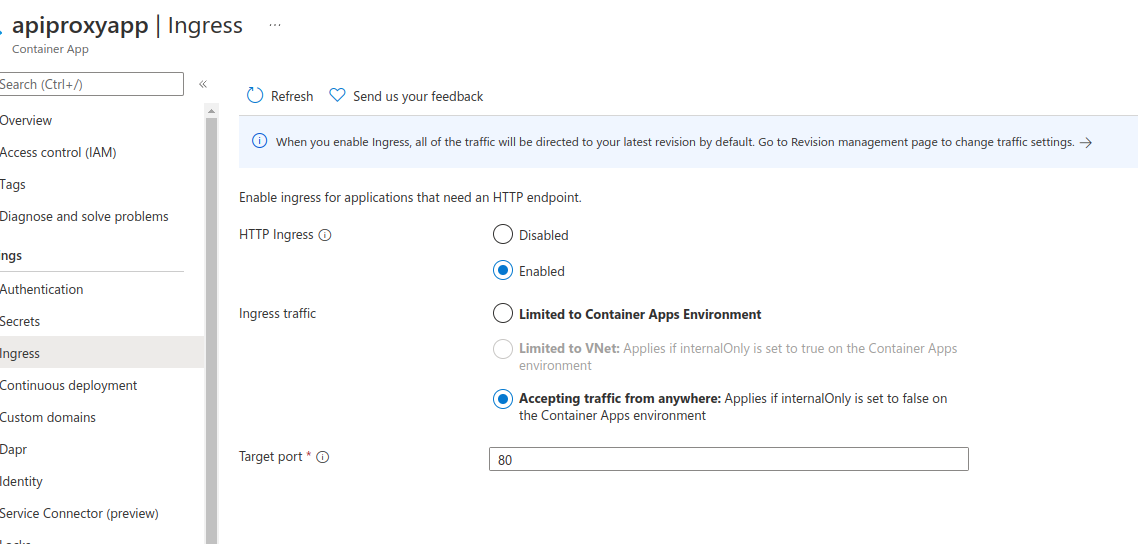
Create + Configure Azure Container App


Execution

Deploy and Test Container App in APIM


Copyright ©1993-2024 Joey E Whelan, All rights reserved.

Sunday, May 15, 2022

RedisTimeSeries

Summary

I'll be covering an IoT data feed use case in this post.  That data feed originates from a Tempest weather station and is stored on a Redis instance as TimeSeries data.  The application is implemented as a container on Google Cloud Run.  The Redis TimeSeries data is visualized using Grafana.

Architecture


Application


ExpressJS REST API Server

Very simple server-side app to start and stop the data flow.
app.post('/start', async (req, res) => {
    try {
        if (!tc) {
            tc = new TempestClient();
            await tc.start();
            res.status(201).json({'message': 'success'});
        }
        else {
            throw new Error('tempest client already instantiated');
        }
    }
    catch (err) {
        res.status(400).json({error: err.message})
    };
});

app.post('/stop', async (req, res) => {
    try {
        if (tc) {
            await tc.stop();
            tc = null;
            res.status(201).json({'message': 'success'});
        }
        else {
            throw new Error('tempest client does not exist');    
        }
    }
    catch (err) {
        res.status(400).json({error: err.message})
    };
});

Tempest Client

Weatherflow provides a published REST and Websocket API.  In this case, I used their Websocket interface to provide a 3-second feed of wind data from the weather station.

    async start() {
        if (!this.ts && !this.ws) {
            this.ts = new TimeSeriesClient(redis.user, redis.password, redis.url);
            await this.ts.connect();
            this.ws = new WebSocket(`${tempest.url}?token=${tempest.password}`);

            this.ws.on('open', () => {
                console.log('Websocket opened');
                this.ws.send(JSON.stringify(this.wsRequest));
            });
        
            this.ws.on('message', async (data) => {
                const obj = JSON.parse(data);
                if ("ob" in obj) {
                    const time = Date.now()
                    const speed = Number(obj.ob[1] * MS_TO_MPH).toFixed(1);
                    const direction = obj.ob[2];
                    console.log(`time: ${time} speed: ${speed} direction: ${direction}`);
                    await this.ts.update(tempest.deviceId, time, speed, direction);                
                }
             });

            this.ws.on('close', async () => {
                console.log('Websocket closed')
                await this.ts.quit();
                this.ts = null;
                this.ws = null;
            });

            this.ws.on('error', async (err) => {
                await this.ts.quit();
                this.ws.close();
                this.ts = null;
                this.ws = null;
                console.error('ws err: ' + err);
            });
        }
    }

    async stop() {
        this.ws.close();
    }

Redis TimeSeries Client

I used the Node-Redis client to implement a function that performs a TimeSeries Add.  
    async update(deviceId, time, speed, direction) {
        await this.client.ts.add(`wind_direction:${deviceId}`, time, direction);
        await this.client.ts.add(`wind_speed:${deviceId}`, time, speed);
    }

Deployment

Dockerfile


FROM node:18-slim
WORKDIR /usr/src/app
COPY package*.json ./
RUN npm install
COPY . .
EXPOSE 8080
CMD ["npm", "start"]

Redis Cloud + Insight


Google Cloud Code Integration with VS Code

The app container is deployed to Cloud Run using the Cloud Code tools.


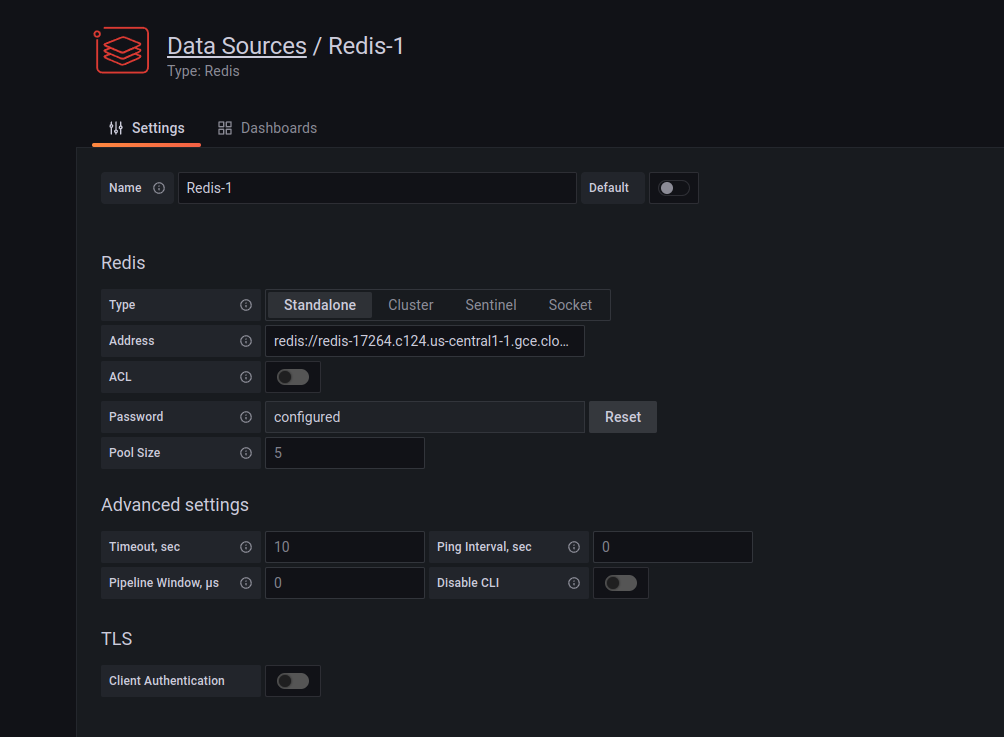
Grafana Data Connection to Redis


Execution

CURL POST To Start Data Flow


curl -X POST https://redis-demo-y6pby4qk2a-uc.a.run.app/start -u yourUser:yourPassword

Redis Insight Real-time Feed


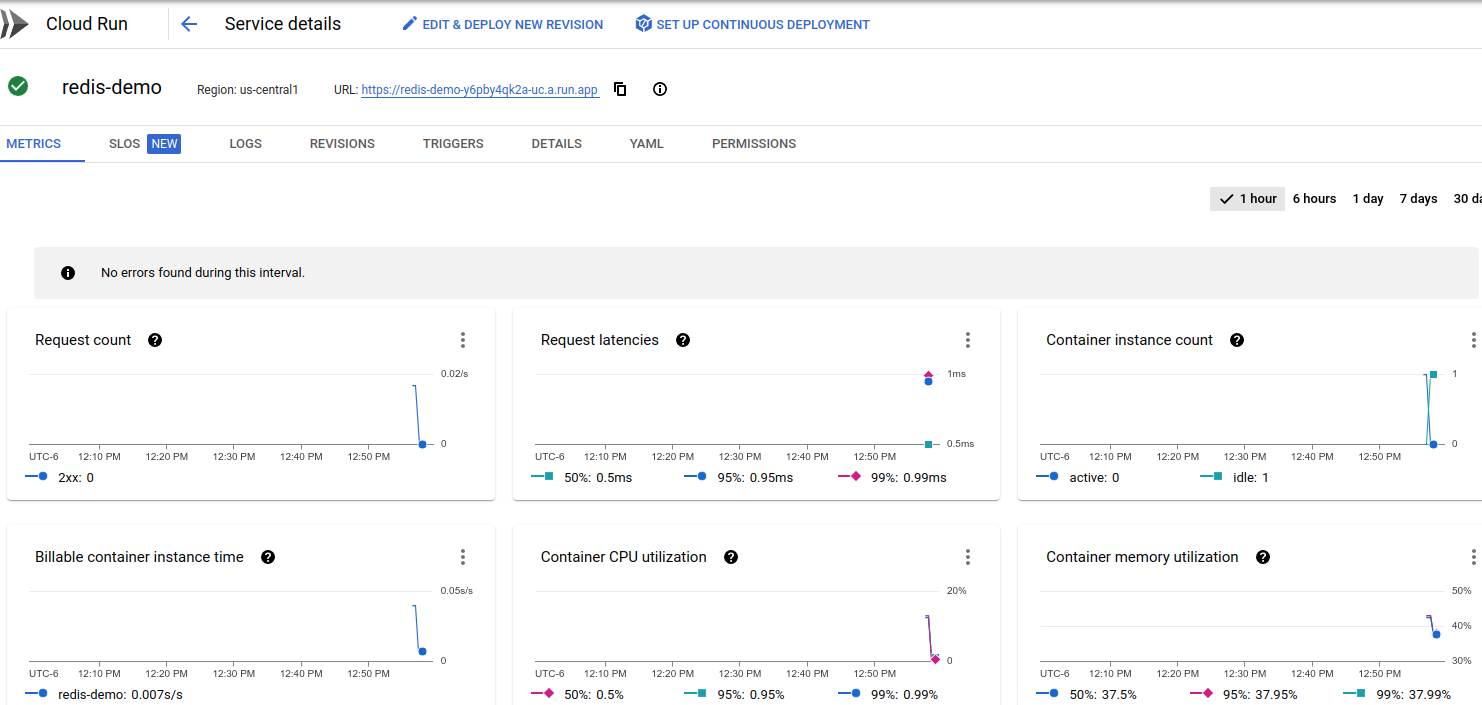
Cloud Run Console


Grafana Dashboard


Source


Copyright ©1993-2024 Joey E Whelan, All rights reserved.

Stable Marriage Problem - Python

 Summary

This short post covers a Python implementation of the Gale-Shapely algorithm for the Stable Marriage Problem (SMP).  Stable matching is a well-studied problem in multiple fields.  It has applications in nearly any two-sided market scenario.

Code Snippets

Preference Generator

Below is a Python function to generate a random set of preferences for two classes.  Those preferences are then subsequently used by Gale-Shapley to determine a stable matching.
def generate_prefs(class1, class2):
    if len(class1) != len(class2):
        raise Exception("Invalid input: unequal list sizes")

    prefs = {}
    for item in class1:
        random.shuffle(class2)
        prefs[item] = class2.copy()
    
    for item in class2:
        random.shuffle(class1)
        prefs[item] = class1.copy()

    return dict(sorted(prefs.items()))

Gale-Shapley

def gale_shapley(prefs, proposers):
    matches = []
    while len(proposers) > 0:  #terminating condition - all proposers are matched
        proposer = proposers.pop(0)  #Each round - proposer is popped from the free list
        proposee = prefs[proposer].pop(0)  #Each round - the proposer's top preference is popped
        matchLen= len(matches)
        found = False
        
        for index in range(matchLen):  
            match = matches[index]
            if proposee in match:  #proposee is already matched
                found = True
                temp = match.copy()
                temp.remove(proposee)
                matchee = temp.pop()
                if prefs[proposee].index(proposer) < prefs[proposee].index(matchee):  #proposer is a higher preference 
                    matches.remove(match)  #remove old match
                    matches.append([proposer, proposee])  #create new match with proposer
                    proposers.append(matchee)  #add the previous proposer to the free list of proposers
                else:
                    proposers.append(proposer)  #proposer wasn't a higher prefence, so gets put back on free list
                break
            else:
                continue
        if not found:  #proposee was not previously matched so is automatically matched to proposer
            matches.append([proposer, proposee])
        else:
            continue
    return matches

Output

Below is a sample run with two three-member classes: (a1, a2, a3) and (b1, b2, b3).
Preferences
{'a1': ['b2', 'b3', 'b1'],
 'a2': ['b3', 'b2', 'b1'],
 'a3': ['b1', 'b2', 'b3'],
 'b1': ['a2', 'a1', 'a3'],
 'b2': ['a1', 'a3', 'a2'],
 'b3': ['a3', 'a1', 'a2']}

Matches
[['a3', 'b1'], ['a1', 'b2'], ['a2', 'b3']]

Source


Copyright ©1993-2024 Joey E Whelan, All rights reserved.

Sunday, February 20, 2022

API Proxy - Docker

Summary

This post covers a machine-to-machine use case where the provider has only a SOAP interface to their services but the client can only support a REST interface.  One possible solution to that dilemma is to deploy middleware in the form of a proxy between the two entities.

Concept

The diagram below depicts overall the architectural concept.  The SOAP API is mediated by a REST API.


App Architecture

The REST proxy is implemented via the FastAPI framework.  SOAP interactions are managed via the Zeep package.  The HTTP server is provided by Uvicorn.  The entire package is deployed as a container via Docker.  The SOAP service being used here is simple/toy example here.


Environment Set Up

I'm using Visual Studio Code to develop this in Python.  A Python virtual environment can be set up with the command below:

python3 -m venv env

Code

The Python code below implements a REST proxy for two different SOAP endpoints.

client = Client('https://www.w3schools.com/xml/tempconvert.asmx?wsdl')
app = FastAPI()

@app.get("/CelsiusToFahrenheit")
async def celsiusToFahrenheit(temp: int): 
    try:
        soapResponse = client.service.CelsiusToFahrenheit(temp)
        fahrenheit = int(round(float(soapResponse),0))
    except:
        raise HTTPException(status_code=400, detail="SOAP request error")
    else:
        return {"temp": fahrenheit}


@app.get("/FahrenheitToCelsius")
async def fahrenheitToCelsius(temp: int): 
    try:
        soapResponse = client.service.FahrenheitToCelsius(temp)
        celsius = int(round(float(soapResponse),0))
    except:
        raise HTTPException(status_code=400, detail="SOAP request error")
    else:
        return {"temp": celsius}

Container Set Up

Python library requirements for the app are stored to a text file with the command below:

pip freeze > requirements.txt
Docker file below:

FROM python:3.9-slim
COPY proxy.py proxy.py
COPY requirements.txt requirements.txt
RUN pip install --no-cache-dir --upgrade -r requirements.txt
CMD ["uvicorn", "proxy:app", "--host", "0.0.0.0", "--port", "80"]
Screenshot of the resulting container in Studio Code's Docker tool:

Execution


$ curl 'http://localhost/FahrenheitToCelsius?temp=32'
{"temp":0}

Source


Copyright ©1993-2024 Joey E Whelan, All rights reserved.

Saturday, December 11, 2021

Javascript Function Argument Options and Object Conditionals

Summary

This post is purely some code examples of different ways to structure arguments to functions.  I show some examples of conditional object properties as well.

Base

function example1(p1,p2,p3) {
    console.log('example1');

    const params = {
        "p1": p1,
        "p2": p2,
        "p3": p3
    };
    console.log(params);
};
example1('a', 'b', 'c');
example1
{ p1: 'a', p2: 'b', p3: 'c' }


Insufficient Number of Arguments

function example2(p1,p2,p3) {
    console.log('\nexample2')
    const params = {
        "p1": p1,
        "p2": p2,
        "p3": p3
    };
    console.log(params);   
};
example2('a', 'b');
example2
{ p1: 'a', p2: 'b', p3: undefined }


Argument with a default value

function example3(p1,p2,p3='c') {
    console.log('\nexample3')
    const params = {
        "p1": p1,
        "p2": p2,
        "p3": p3
    };
    console.log(params);
};
example3('a', 'b');
example3
{ p1: 'a', p2: 'b', p3: 'c' }


Arguments passed as an object

function example4(allparms) {
    console.log('\nexample4')
    const params = {
        "p1": allparms.p1,
        "p2": allparms.p2,
        "p3": allparms.p3
    };
    console.log(params); 
}
example4({"p1": 'a', "p2": 'b', "p3": 'c'});
example4
{ p1: 'a', p2: 'b', p3: 'c' }


Argument object destructured

function example5({ p1,p2,p3 }) {
    console.log('\nexample5');

    const params = {
        "p1": p1,
        "p2": p2,
        "p3": p3
    };
    console.log(params);
};
example5({"p1": "a", "p2": "b", "p3": "c"});
example5
{ p1: 'a', p2: 'b', p3: 'c' }


Destructured arguments, undefined argument

function example6({ p1,p2,p3 }) {
    console.log('\nexample6');

    const params = {
        "p1": p1,
        "p2": p2,
        "p3": p3
    };
    console.log(params);
};
example6({"p1": "a", "p2": "b"});
example6
{ p1: 'a', p2: 'b', p3: undefined }


Destructured arguments, undefined arg, conditional object property

function example7({ p1,p2,p3 }) {
    console.log('\nexample7');

    const params = {
        "p1": p1,
        "p2": p2,
        ...(p3 && {"p3": p3})
    };
    console.log(params);
};
example7({"p1": "a", "p2": "b"});
example7
{ p1: 'a', p2: 'b' }


Destructured arguments, default value

function example8({ p1,p2,p3='c' }) {
    console.log('\nexample8');

    const params = {
        "p1": p1,
        "p2": p2,
        ...(p3 && {"p3": p3})
    };
    console.log(params)
};
example8({"p1": "a", "p2": "b"});
example8
{ p1: 'a', p2: 'b', p3: 'c' }


Variadic function, spread operator

function example9(...allParms) {
    console.log('\nexample9');

    let params = {};
    let ind = 1;
    for (let parm of allParms) {
        params[`p${ind++}`] = parm;
    };

    console.log(params);
};
example9("a", "b", "c");
example9
{ p1: 'a', p2: 'b', p3: 'c' }


Gist


Copyright ©1993-2024 Joey E Whelan, All rights reserved.

Saturday, December 4, 2021

Google Cloud Serverless VPC + Cloud Functions

Summary


I'll show an example configuration of GCP Serverless VPC Access in this post.  The scenario here will be a Cloud Function that needs to access Memorystore (GCP managed Redis).  Memorystore is isolated in a VPC with a private range address - which is good as far as security is concerned.  To access that VPC from Cloud Functions, a Serverless VPC connector needs to be built.

Architecture


Memorystore Configuration


Serverless VPC Configuration


Cloud Function Configuration


Cloud Function Redis Client Connection Code


const {createClient} = require('redis');

    getClient() {
        const client = createClient({
            socket: {
                host: process.env.REDIS_HOST
            },
            password: process.env.REDIS_PASS
        });
        client.on('error', (err) => { 
            throw Error(`redis client error: ${err}`);
        });
        return client;
    }

Copyright ©1993-2024 Joey E Whelan, All rights reserved.

Sunday, November 28, 2021

Google Cloud API Gateway - M2M client, GCF server

Summary

I'll be showing some of the detailed configuration necessary to deploy API Gateway with a Cloud Functions back-end and authentication for a non-human (machine) client.  I'll be focusing on the front and back-end authentication configuration.  I'll also be showing the client side in Node.js which is very thinly documented by Google.


Architecture


Authentication

Back-end:  Cloud Functions

The back-end GCF is deployed requiring authentication.  The API Gateway is configured to operate under a Service Account that has the Cloud Function Invoker role.

Front-end:  Machine Client

Configuration here is significantly more complicated than the back-end.  Configuration areas:
  • A Service Account needs to be created and a SA key downloaded.  That key is then used to sign a JWT for authentication to the API Gateway.
  • Security definitions must be added to OpenAPI spec (Swagger 2.0) that specify that SA as an allowed user.
  • The Machine Client itself must generate a JWT to the API Gateway specs and sign that JWT with the SA key.

Code

OpenAPI Security Definition

securityDefinitions:
  machine-service:
    authorizationUrl: ""
    flow: "implicit"
    type: "oauth2"
    x-google-issuer: "machine-service@kvpstore.iam.gserviceaccount.com"
    x-google-jwks_uri: "https://www.googleapis.com/robot/v1/metadata/x509/machine-service@kvpstore.iam.gserviceaccount.com"
security:
  - machine-service: []

Machine Client-side 


'use strict';
const fetch = require('node-fetch');
const jwt = require('jsonwebtoken');
 
const sakey = require('./sakey.json');  //json file downloaded from Google IAM
const EMAIL = sakey.client_email;
const AUDIENCE = 'your audience';// this value corresponds to the "Managed service" name of the API Gateway
const ALGORITHM = 'RS256';
const GWY_URL = 'your URL';
const KEY = sakey.private_key

function exampleAPICall(email, audience, key, algorithm) {
    const payload = {
        iat: Date.now(),
        exp: Date.now() + 3600,
        iss: email,
        aud: audience,
        sub: email,
        email: email
    }

    const token = jwt.sign(payload, key, {algorithm: algorithm});
    
    const response = await fetch(`${gwyurl}/guid`, {
        method: 'GET',
        headers: {
            'Authorization': `Bearer ${token}`
        }
    });
    return await response.json();
}

Copyright ©1993-2024 Joey E Whelan, All rights reserved.